Is Blogging Good For SEO? Or Can It Do More Harm Than Good

After building ShutterCoWA‘s new website, we did what we do for every website that we launch – we monitor the Google rankings and make slight changes where necessary to ensure smooth sailing.

The issue we had with this website is that Google was continually swapping around the pages they had indexed for our main commercial-intent keywords.
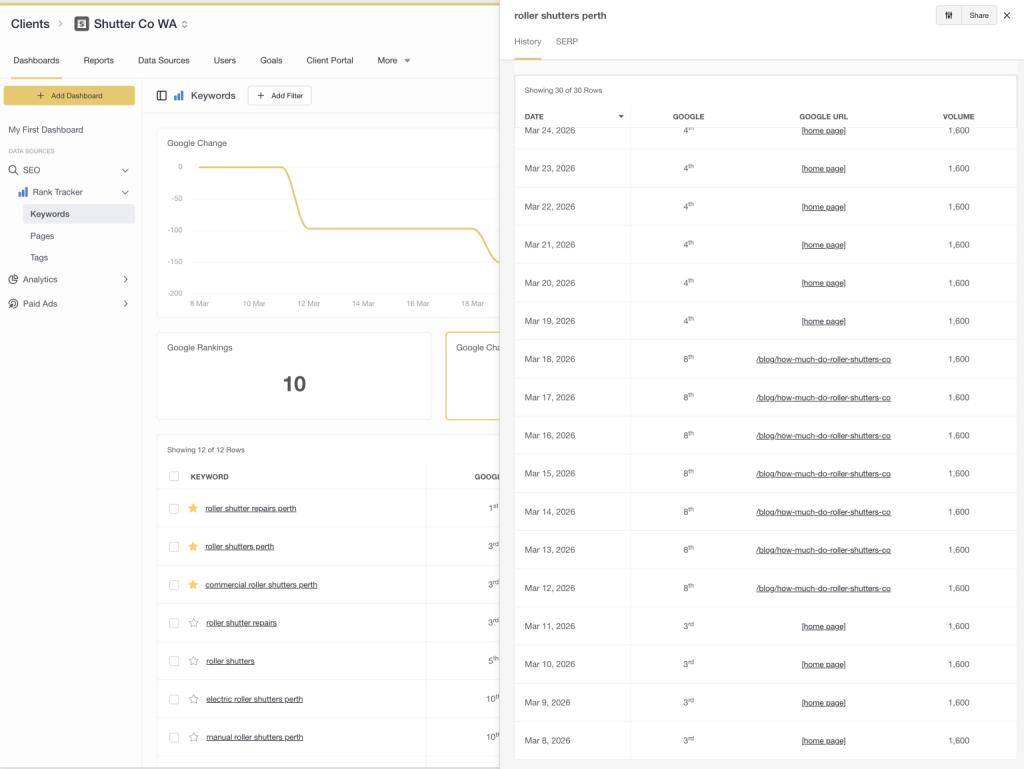
In order to fix this, we had to do a few things:

  • 301 redirect the blog posts causing confusion to the target page
  • Improve internal linking to indicate what the core page for this topic is
  • Fix up other blog posts that closely matched commercial serach intent before they too caused issues

Had these issues gone un-noticed and not fixed, it would have severly impacted both their SEO long-term as well a drop in genuine enquiries (potentially resulting in tens of thousands of dollars worth of missed opportunities).

Blogs Have Been Marketed By Agencies

For years, blogging has been pushed as a “must-do” for Search Engine Optimisation.
More blogs = more keywords = more traffic… right?
Well…as the great saying in SEO goes; “it depends”.
In an age where SEO has become more complicated, a lot of agencies have resorted to populating blogs in order to justify their retainers.
The problem is that a lot of these agencies are just adapting to the market and don’t actually know what they’re doing.
Blogging done the wrong way can actively hold your website back
Let’s break down where things go wrong, and how to actually use blogging to strengthen your SEO instead of sabotaging it.

The Problem: Blogs Competing With Your Money Pages

One of the most common mistakes we see is businesses using blog posts to target their main commercial keywords.
Things like:

  • “Plumber Perth”
  • “Air Conditioning Installation Perth”
  • “Roller Shutters Perth”

On the surface, it feels logical. More content around those keywords should help… right?
But here’s the issue.
When you create multiple pages targeting the same intent, you’re not strengthening your SEO – you’re splitting it.
Instead of one strong, clear signal to Google, you’re giving it multiple options and saying:
“You figure out which one matters.”
And often, Google gets it wrong.

What Actually Happens (And Why It Hurts Rankings)

When blog posts target your core service keywords, a few things tend to happen:

1. Keyword Cannibalisation

Your blog and your service page start competing against each other.

Neither becomes as strong as it could be because authority is split.

2. Diluted Relevance

Your main service page is supposed to be your strongest, most focused page for that keyword.

But if you’ve got multiple blogs loosely targeting the same topic, Google starts to lose confidence in which page is the “real” one.

3. The Wrong Page Gets Indexed

Sometimes Google will rank your blog instead of your service page.

Sounds fine… until you realise:

Blogs don’t convert nearly as well
They’re not structured to sell
They often miss key trust signals

So you end up with traffic but fewer enquiries.

4. Slower SEO Progress

Instead of building one powerful page that climbs rankings, you’re spreading effort across multiple weaker ones.

It’s the difference between one strong signal and multiple, mixed signals.

So… Should You Avoid Blogging?

Blogging is still incredibly powerful for SEO when it’s used properly.

The key is understanding the role blogs should play.

What Blogging Should Be Used For Instead

Rather than targeting your main commercial keywords, blogs should focus on:

Informational & Research-Based Searches

These are the types of queries people search before they’re ready to buy:

  • “Is upgraded air conditioner ducting worth it for Perth summers?”
  • “Why is my roller shutter stuck?”
  • “How often should I service my car?”

These searches will show Google that you’re an authority on the topic, especially if you’re generating good user metrics.

You will likely attract traffic for a lot of out-of-area visitors – it doesn’t matter. These pages are not designed to sell, they’re designed to inform and position your business as an authority which helps life the trust of your entire business/domain.

Your blog content should act like support beams for your main service pages.

Each blog should:

  • Target a specific question or niche topic
  • Internally link back to your main service page
  • Reinforce your authority around that service

Over time, this builds a clear structure:

  • Service page: Sales page
  • Blogs: Supporting content

The Real SEO Play: Topic Clusters

This is where things start to click.

Instead of random blogs, you build a structured content ecosystem.

For example:

Main Page:

  • Air Conditioning Perth

Supporting Blogs:

  • How much does air conditioning cost in Perth?
  • Split system vs ducted: what’s more suitable for Perth?
  • 5 signs you need a new air conditioner
  • How long does aircon installation take?

Each of these blogs links back to the main page.

Now, instead of competing pages, you’ve created a network that tells Google:

“This main page is the authority and all of this content supports it.”

Internal Linking Is Where the Magic Happens

A blog on its own doesn’t do much.

A blog that links strategically? That’s where SEO starts to compound.

Every supporting article should naturally guide users back to your core pages.

Not forced. Not spammy. Just logical.

For example:

If someone is reading about air conditioning costs, it makes perfect sense to direct them toward your installation service.

This helps users take the next step, passes SEO value to your main pages and reinforces page hierarchy in Google’s eyes

The Bottom Line

Blogging isn’t about pumping out content for the sake of it.

And it’s definitely not about chasing the same commercial keywords across multiple pages.

Done wrong, it creates confusion, weakens your rankings, and brings in the wrong kind of traffic.

Done right, it strengthens your entire website.

A Better Way to Think About Blogging

Your website should work like a well-structured sales system:

Core pages are built to rank and convert.
Blogs are built to educate, attract, and support.

When those two work together, everything becomes clearer:

  • Clear signals to Google
  • Stronger rankings for the pages that matter
  • Better quality leads

How To Track A Thank You Page Visit In GA4

As we say goodbye to Google’s much loved Universal Analytics, we now need to adjust to life with GA4.

It all kinda looks the same, but feels very different. Especially in how we set up goals.

Why this method?

Most marketers tend to use the Contact Form Submission trigger in Google Tag Manager, as it’s quite easy to set up (especially whilst setting up other tags/triggers there).

The beauty of having a contact form redirect to a thank you page upon completion is that the page is only viewed when someone successfully completes the contact form.

Whereas the standard Contact Form Submissions trigger will fire whenever someone clicks the Send/Submit button, even if the form has not been successfully filled.

So, this is a more reliable way to track contact form submissions on your website.

Instructions

Step 1: Click on Admin, in the bottom left corner of your screen.

Step 2: Click on Events

Step 3: Click “Create event”.

Step 4: Click “Create”.

Step 5: Create a custom name for this goal, I usually name it “contact_form”

Then fill the parameter as below.

My thank you page for this website ends with /thank-you/

If your thank you page is different, like /thanks/ or /success/ then you’ll need to adjust the value appropriately.

Step 6: You’ll see your Custom event has been created. Close out of that section and click on to the Conversions tab.

Step 7: Click on “New conversion event”.

Step 8: We need to input our new event name. This has to match exactly what we named our custom event.

In this case, our custom event was called “contact_form”.

If you named your event differently, you’ll have to adjust accordingly.

Step 9: Success! You’ve now created a goal to track a thank you page visit in GA4.

You can now view how many people have successfully completed contact forms and even pull that conversion metric into your Google Ads account.

Add Google Call Forwarding Through Google Tag Manager

NOTE: We have found that from time to time, the Google Forwarding Number redirects to another number – especially if the ads associated with that number were paused for a period of time. If you’re going to use the free forwarding number from Google, ensure that you know what the number is and periodically call it to ensure it’s working. For this reason, we’ve stopped using this Google service at Harmonised as misdirected calls could mean hundreds, thousands, even tens of thousnads of dollars in missed opportunities for clients if we don’t pick up on an error fast enough.

For clients with lower budgets, we simply make do with tracking telephone link clicks. For other clients who don’t mind spending money for additional insights, we used a paid call tracking service like Avansar or CallRail.


The Google Forwrading Number is one of the greatest tools up any marketer’s sleeve. It’s completely free and it provides powerful data as to how many confirmed phone calls are being generated by your campaigns.

In Australia, this service will mask your existing phone number with either an 1800 or 1300 number. You don’t have any way of knowing what that number is going to be beforehand.

So, how do we set it up?

Setting up the Conversion

First, we need to set up the Google Forwading Number in Google Ads.

Step 1: Go into “Tools and settings”, then click on “Conversions”.

Step 2: Click on the blue button “New conversion action”

Step 3: Click the “Phone calls” box

Step 4: Select “Call to a phone number from your website” and click continue.

Step 5: Fill in the details for your conversion. You can call the Conversion name whatever you’d like.

Make sure that the phone number matches the phone number on your website exactly.

I personally also like to make sure phone calls are registered after 10 seconds to make sure every call is being registered. The default settings are 60 seconds, which I personally think is too long and can mean that you’re not taking the credit for some calls.

Step 6: Next, you’re going to be asked how you want to install your tag. In this example, we’re going to select “Use Google Tag Manager” to get the details needed to set this up in Google Tag Manager.

Setting up the tag in GTM

Step 7: Google Ads will now provide us the necessary information to copy and paste over to Google Tag Manager (Conversion ID and Conversion label), so keep this window open for now.

Step 8: Go into Google Tag Manager and create a new tag.

Step 9: Click on “Tag Configuration”.

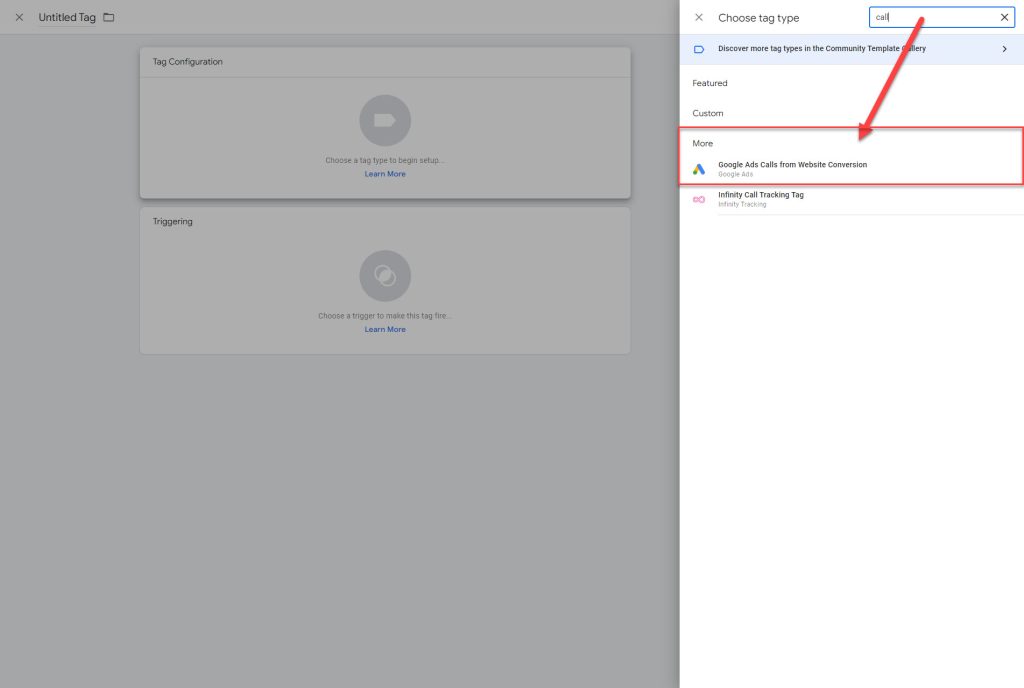
Step 10: Because this goal is not immediately visible, we’ll use the search function in the top right to get to it quickly.

Step 11: Just by putting “call” into the search box, you’ll now see the Tag “Google Ads Calls from Website Conversion”. Let’s click on that.

Step 12: Go ahead and copy/paste the Conversion ID and Conversion Label from Google Ads (from Step 7).

Step 12: Click on “Trigger” and select “All Pages”.

Step 13: Give your Tag a name and click Save in the top right corner.

Great, the tag is there – but it’s not going to work for this client just yet because I haven’t set up a “Conversion Linker”.

Conversion Linker

Step 14: Create a new Tag and click “Conversion Linker”

Step 15: Make sure that you tick “Enable linking on all page URLs”. Then, select “All Pages” under Triggering.

And of course, don’t forget to Publish all of your changes in Google Tag Manager afterwards.

How To Track Telephone Link Clicks in Google Analytics

There are a lot of guides online on how to set up conversions in GA4 and Google Tag Manager, many of them confusing to those who aren’t already familiar with the newer generation of Google products.

In this guide, we’ll show you how to set up tracking for telephone link clicks in GA4 using the most simplistic approach possible.

To avoid additional complications, this guide does not show you how to test/preview the goal.

However, this is a very straight forward conversion event to set up and there are no circumstances where this goal won’t work.

Therefore we don’t need to preview/test that the goal is working.

First off, we’ll need two things:

  1. A Google Tag Manager (GTM) account
  2. A Google Analytics (GA4) account

Both of these are free, quick and easy to set up.

Then, you’ll need to do two things:

  1. Install the GTM code on your website (instructions post to come)
  2. Link GA4 to GTM (instructions post to come)

With all of the above completed, we can begin:

Instructions

Step 1: Go to the Trigger section in GTM and click “New”.

Step 2: We need to name our trigger, so let’s call it something like “Tel Link Clicks”. What you name this tag doesn’t impact tracking so name it whatever you prefer.

Step 3: Click on the white box that asks you to choose a trigger type.

Step 4: A new menu will appear on the right hand side. Let’s click “Just Links”.

Step 5: We need to select “Some Link Clicks”.

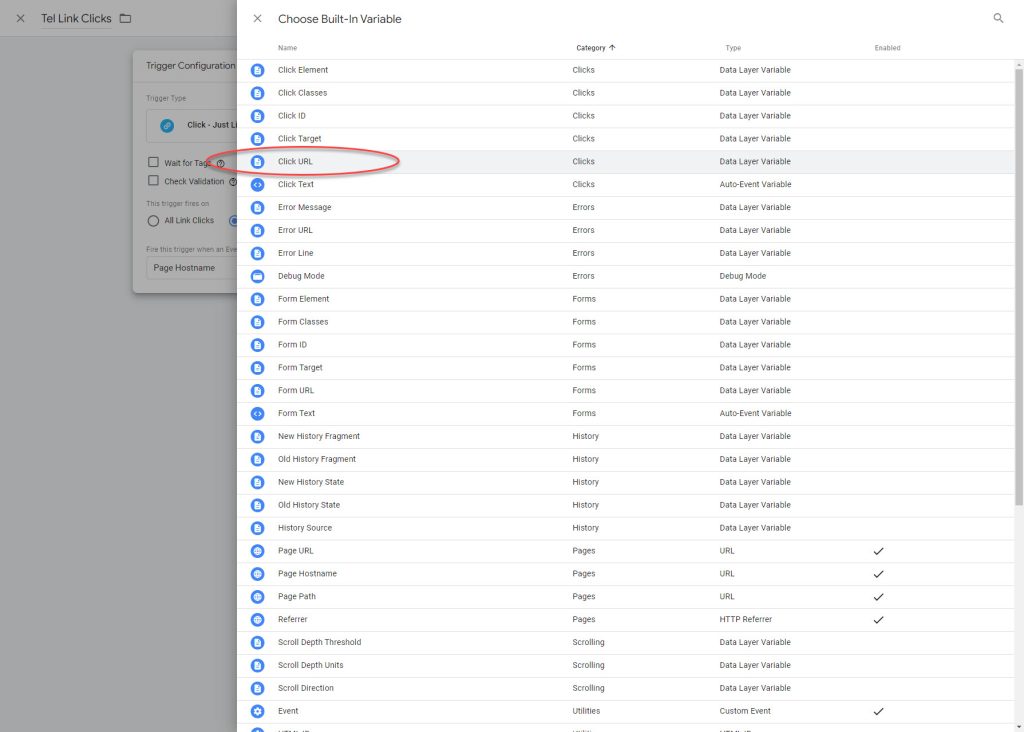
Step 6: By default on a new account, your first condition will be “Page Hostname”. We need to change it to Click URL, which doesn’t appear in the drop down menu, so let’s add it in. Click on “Choose Built-In Variable” from the dropdown box.

Step 7: A menu will appear on the right hand side. Click on “Click URL”.

Step 8: In the third conditions box, add in “tel:”. By doing this, you will track all telephone number links that are clicked on. Then click the “Save” button on the top right of your screen.

Step 9: Great, your trigger is set up. Now let’s go over to “Tags” area through the menu on the left hand side of your screen.

Step 10: Click on the “New” button.

Step 11: Just like before, input a name (eg. Tel Link Clicks) and click on the first white box.

Step 12: A menu will appear on the right hand side. Select “Google Analytics: GA4 Event”.

Step 13: On the “Configuration Tab” drop-down box, click on your linked GA4 configuration.

If you haven’t linked GA4 yet, you can follow this guide here: [LINK TO COME]

If you’re just linking GA4 now, stop what you’re doing, set up the GA4 configuration and then return to Step 10.

Step 14: Populate an “Event Name” such as “tel_link_clicks”.

Step 15: Now, whilst we’re finishing this Tag off, we need to open GA4.

Go to the Admin menu (the little blue cog in the bottom left), then Click on “Conversions”, then “New conversion event”.

Step 16: Once you’ve clicked on “New conversion event”, you will be asked to enter “New event name”.

This name must match the name “Event Name” that you entered in our GTM Tag back at Step 14.

If these names do not match exactly, the information will not get pushed from GTM to GA4 and the conversion tracking will not work.

Enter the event name and hit “Save”.

Step 17: Great! You’ve set up the new conversion event in GA4. But it won’t work just yet.

Now we have to return to Google Tag Manager (GTM) to finish off the tag.

Step 18: Back in GTM, we’re going to finish setting up the Tag that we started back at Step 14.

Click on the bottom white box to select what will trigger this Tag.

Step 19: A menu will appear from the right.

Select the “Tel Link Clicks” Trigger (if you named the Trigger differently back in Step 2, it will appear under that name).

Step 20: This is how your completed Tag Configuration should look.

Now hit the “Save” button.

Step 21:  Congrats! You’ve set up the tag!

Now all that’s left to do is hit “Publish” on the top right hand corner.

Running Google Ads for Tradies

Are you a trade business looking for Google Ads management? Click here.

A specialised field

Trades such as plumbing and electrical services can be among the hardest campaigns to run profitably.

There are countless competitors all vying for space at the top of Google, everyone is shouting out free quotes and lowest prices and the cost per clicks are seemingly always rising.

Even experienced Google Ads managers have trouble making a high-converting and highly profitable campaign at the best of times, if they haven’t had a wealth of experienced dealing with your industry.

That’s where knowing a few extra tips and tricks can really come in handy.

Negative keywords

Negative keywords are an essential part of running a good Google Ads account as Google are pretty keen to match your keywords with anything closely related.

Believe it or not, Google will happily match your contracting/service keywords with terms related to DIY advice, tools, stores or supplies. That’s obviously not the type of search intent that we want to be paying for.

If you’re a tiler, for example, you will want to think about all the different pieces of equipment that you use on the job (and that other tilers/DIYers may be searching for) and make sure you’re not wasting money on those searches.

So, you’d add words into your negative keyword list such as:

  • Clips
  • Seats
  • Wedges
  • Cement
  • Scraper
  • Blade
  • Knife
  • Tools

Eliminating these terms from triggering your ads will greatly reduce the amount of wasted spend from the get-go and increase the likelihood of paying for traffic that is actually searching for trade services.

Every Bob, Dick and Harry

It’s another negative keyword tip, but one that is a very specific problem to tradies and one that may not be obvious when first setting up an account.

Often, when I’m looking through the search terms of plumbers, electricians, painters, carpet cleaners, antenna installers or any other trade-based client – a large amount of search terms that are being broadly matched with our keywords are “first name + surname plumbing”

That’s why it’s a good idea to get a negative keyword list together of all the most common names in the English language to get a head start on culling as many of these searches as possible.

Block Competitors’ Names

Whilst we’re blocking searches for other random tradesman, the next logical step would be to add other companies as negative keywords too.

The easiest way to get a list together, other than putting down the well-known players in the industry, is to just do a Google search. So, if you’re an electrician in the Perth metropolitan area you would search for “electricians Perth” to check out who is around.

Go ahead and add all those companies into your negative keywords (or compile a “Competitors” Negative Keyword List).

If we’re going tobid on competitors’ brand names , it’s best to do it in a more organised, targeted and measurable approach rather than just have them broadly matching with keywords like “plumber near me”.

Local Appeal

When people have problems around the home, they’re typically looking up the service plus their specific suburb with the hope that the service will be both quicker and cheaper using someone local.

Having separate AdGroups for each specific suburb that you wish to target along with matching ads that mention that targeted suburb will go a long way to set you apart from other ads that are using the same generic ads that they’d use for their non-geo or city area keywords.

Be Aggressive With Ads

You really want to make you competitive advantage known in your ads to increase the likelihood of getting relevant clicks to your website.

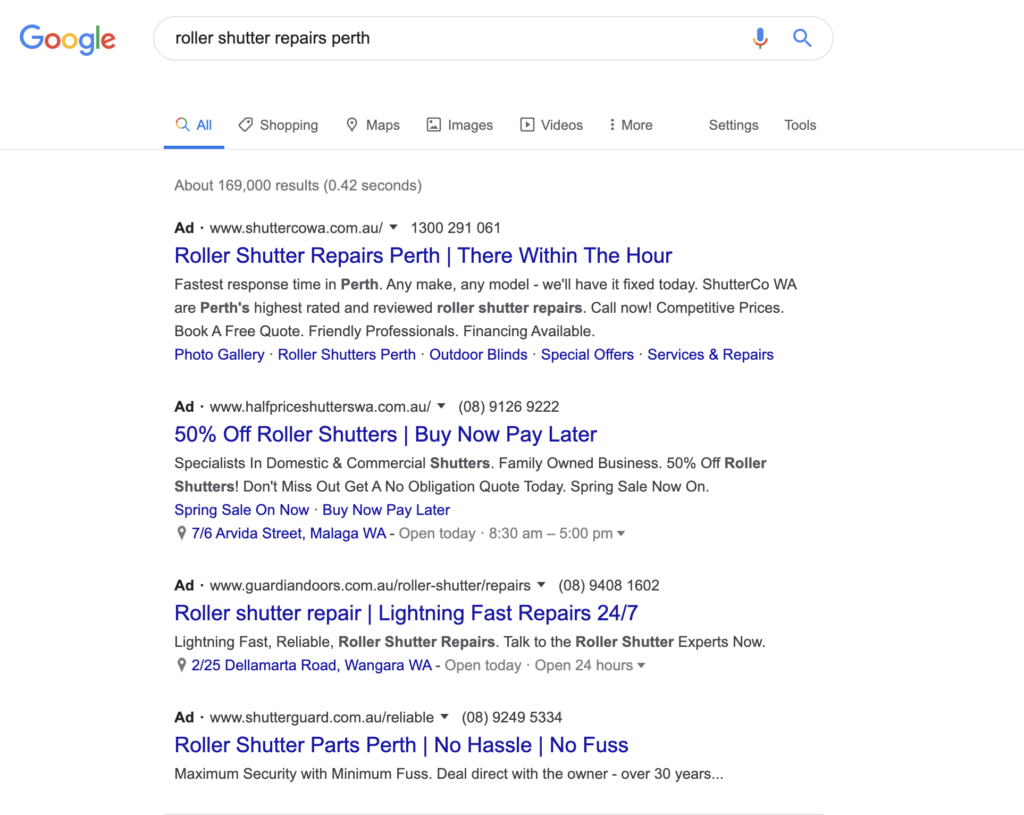
You’ll notice for this ad for Shutter Co WA that they’re the only roller shutter repair business who can claim to be there within one hour.

So, for a business owner who is trying to open up shop for the day and found that their roller shutters have been vandalised – it is clear who the most appealing option

(You will also notice in this screenshot that some advertisers have not set their accounts up very well and are showing sales or parts ads for a repairs keyword).

It’s always about being relevant to the customer. Being qualified and with 20+ years of experience isn’t a strong competitive advantage when trying to immediately grab someone’s attention. They’re looking for tangible value such as price and convenience.

After Hours Campaigns + Call Only Ads

Instead of having one campaign that is going to serve all day long, why not separate them into regular hours and after-hours?

There’s a few good reasons to do this.

One is that you can write your ads differently depending on what time of day you’re targeting. If you’re advertising in regular hours, saying that you’re available 24/7 becomes irrelevant.

However, after-hours, saying that you’re available 24/7 and can be available within the hour is a great call to action.

You can also try utilising call-only ads during after-hours so that when the search user clicks the ad, it goes straight to a phone call instead of visiting your website. Normally, people like to see the website of the business that they’re contacting first but in a plumbing or electrical emergency, for example, people tend to be okay with such a direct approach.

With the increased profit margins of after-hours work, having a separate campaign allows you to bid at a higher cost per click than what you would during regular hours.

Having a website that converts

Running Google Ads can be unforgiving if you aren’t leading your traffic to a website that tells visitors what they need to know, and you make it easy for them to get in touch.

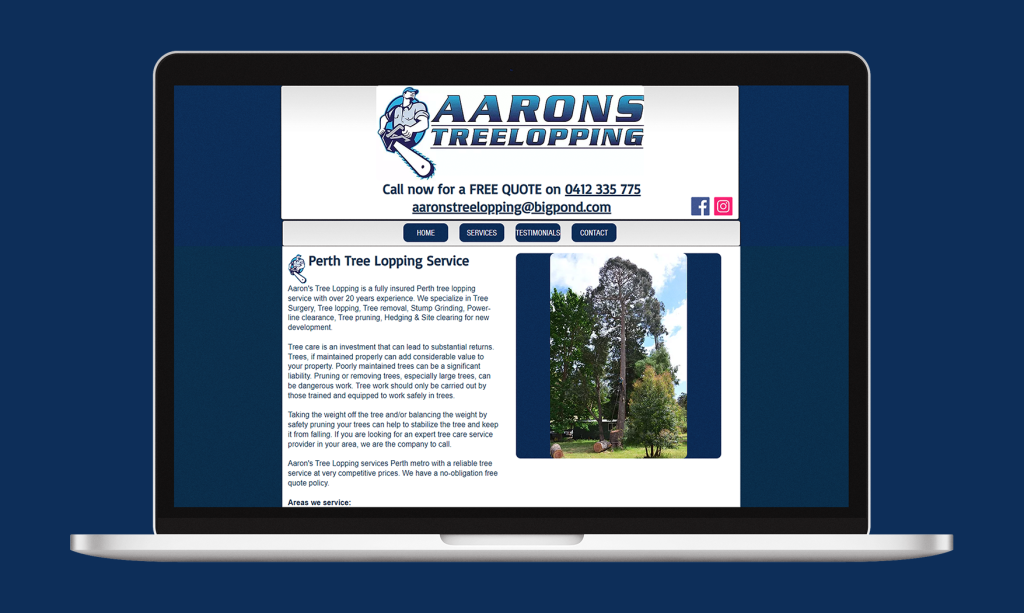
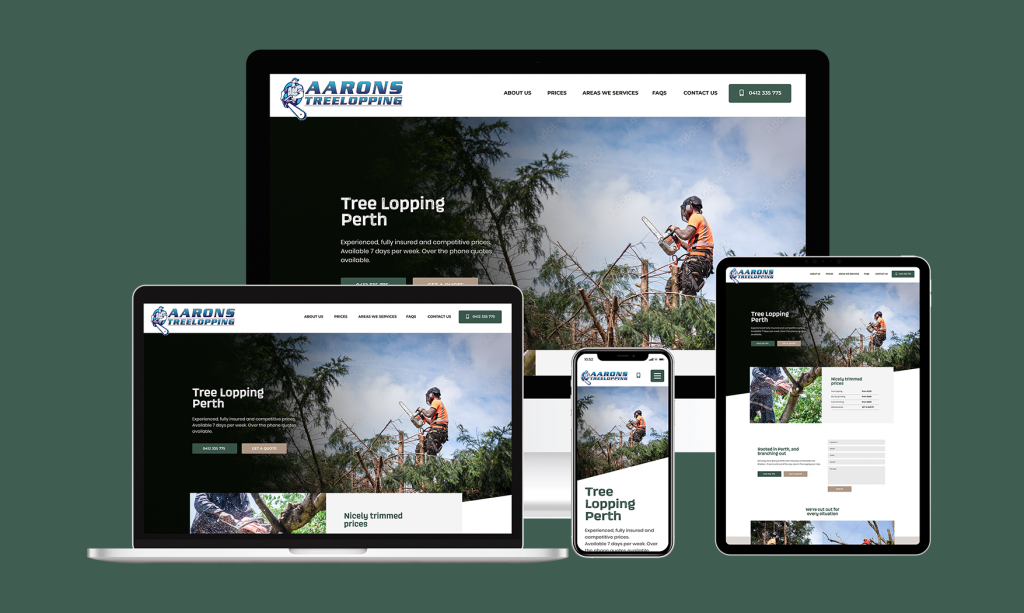
Take a look at the old Aaron’s Tree Lopping website below:

This website converted basically zero Google Ads traffic. We had to address this with a far more functional website, otherwise we were just going to throw money down the toilet.

Once we launched this new website, they started converting 30% of traffic.

It’s easy to see why. Nicer imagery, easy to spot call and contact forms as well as clearly laid out prices. What more do customers need?

Tracking Is Vital

As with any good Google Ads campaign, making sure that you’re tracking every meaningful action is vital to knowing what is working in your account and how to further improve things.

This means:

  • Tracking phone calls to your business
  • Tracking contact forms filled
  • Tracking online bookings made (if applicable)

Google provides a free tracking number which will redirect any calls made to your normal phone number. When that tracking number is called, Google will credit that call to the keyword, ad, location, device and so much more.

If you really want to get deep into the call data, there are companies such as Avanser who offer call-recording which not only helps you to hear the quality of customers that your ads are generating, but if you’ve got someone else answering the phones it often offers great insights to where things may be dropping off in the sales process.

When I was working with a pest control company, through call tracking we found that the girls in the office who were answering the phones were just giving out prices on demand without explaining the many benefits of selecting them over their cheaper competitors.

This information resulted in additional training for the office staff which then ended up more than doubling the amount of calls that they were converting into booked jobs.

Prioritise Google Reviews

People are not only price conscious, but they also don’t want to waste money on a bad service.

So, more often than not, search users are doing their due-diligence and Googling your brand name (after finding you through a generic search) to see what others are saying about you.

Make sure that you increase the likelihood of people calling you by having a strong presence with your Google My Business listing.

Follow up text messages and emails are just a couple of ways you can encourage people to leave you more reviews on Google.

Finally; realistic expectations

First off, let’s talk about our expectations and how much things should cost.

Google Ads for tradies is expensive, yes. There are plenty of businesses that simply can’t make it work. Not because their web presence is poor, but because their customer retention is poor.

Tradies are paying anywhere between $40 to $100 per lead, depending on the industry and location that you’re in.

Now – if you don’t have a good strategy for customer retention and you typically only see a new customer once, then Google Ads will be unprofitable.

However, if you can turn a new job into a loyal customer, one who continually calls you back and also refers you onto family and friends; then Google Ads can be extremely profitable even at a high cost per lead.

How long does Google Ads take to work?

When investing in any marketing exercise, the idea is to make a return on investment.

And, ideally, the sooner the better.

But how long does it take to get that return on investment and what does it depend on?

The short answer is this: Google Ads can either work immediately, take some time, or not at all.

Whilst that’s not really the clear cut answer most are hoping for, let’s break down the scenarios where the same platform could deliver three very different outcomes.

Google Ads Can Work Immediately

Google Ads can work immediately providing that:

  • Your business is supplying a product/service that is relevant and competitive to your target market
  • You’re working with an adequate marketing budget to give the market enough exposure to your business
  • Know what you can pay for a lead, calculating the lifetime value your average customer
  • Your Google Ads account is being managed efficiently and attentively

We’ll go over these points in more detail below after we’ve run through the scenarios where Google Ads doesn’t work immediately.

Google Ads Can Take Time

However, the first month of Google Ads is always going to be the most inefficient.

So, if you’re seeing some results in your first month but not entirely happy – understand that a part of the process of optimising a Google Ads account is to collect data, refine the campaign and test those refinements.

You must also take into account the commitment requirements and purchase cycle of your product/service.

It is likely that someone searching for a local plumber may call you immediately after searching for a local plumber in Google and clicking on your website. However, it is highly unlikely that someone looking to purchase a renovate their home is going to commit to you the first time they land on your website, even if they’ve specifically searched for home renovations on Google.

Google Ads May Not Work For You

Depending on your business and the market that you serve, Google Ads may not be the right solution for your business.

This is most common in B2B (business to business) industries (such as accounting) where networking, relationship building, and referrals are vital to earning the kind of trust that isn’t typically earned just from landing on a website.

There is also the scenario where, due to such aggressive competition, the price of clicks on keywords relating to your business is simply too high to realistically compete.

Another challenge is when you’re competing with big companies.

For example, if you’re up against a big company that offers electrical, plumbing and HVAC, when they’re bidding on keywords, they’re typically able to bid a lot higher and subsequently pay more per lead due to the fact that they’re able to sell multiple services to that one lead – essentially cutting the cost per lead into thirds.

That makes it a lot harder for companies that offer just plumbing, just electrical or just HVAC services where they need to make profit off just one service per lead.

Or, Google Ads may not be the best way to access your target market.

Despite the rhetoric that old media such as radio and newspaper are dying, I simply couldn’t touch the results that those channels when I’ve run Google Ads for dentists or cruise companies, where the target audience is generally older.

Giving Yourself The Best Chance

In the first scenario, we listed four conditions that were conducive to a successful and explosive outcome Google Ads.

So, let’s dive a bit deeper into those four points and why they are so impactful on the performance of a Google Ads account.

1. Your Business

Two phrases come to mind here.

One of them is that “good products sell themselves”

And the other is “you can’t polish a t*rd”.

Or if we want to be a bit more sophisticated in our marketing speak – there are 4 P’s to a successful business:

  • Product
  • Price
  • Placement
  • Promotion

Notice how only one of those 4 P’s are to do with advertising (Promotion).

That means that what you sell, where you sell it and how much you sell it for contributes to 75% of a successful pitch to market with only 25% of it being down to marketing.

This may sound like us Google Ads professionals voiding ourselves of responsibility but after personally running over 300 Google Ads accounts so far in my career – the correlation is clear.

Good products sell themselves.

And you can’t polish a t*rd.

Be honest with yourself and how appealing your product/service is to the market compared to what your competitors are offering.

2. Adequate Budget

Whilst you can start running Google Ads on a fairly modest budget, some business owners underestimate what a reasonable starting budget is.

When Google Ads (formerly known as Google AdWords) first launched in October 2000, and for a few years after that; the cost per click was so cheap (we’re talking cents) that you could run a wildly successful campaign on just a few dollars per day.

But because the clicks in Google Ads works on a bidding system (whatever people are prepared to pay for a click), and more than just a few businesses have caught on since then – you need to have a serious budget when it comes to getting enough exposure on the platform.

If you’re a roofing contractor and your clicks cost around $4 per click and you only have a budget of $10 per day, you’re only going to 2-3 clicks per day.

Having only 2 visitors to your website per day and expecting the phone to ring off the hook is not realistic even with a well-optimised Ads account.

So, lifting that budget up to $20 per day (allowing 5 visitors per day) or $30 per day (allowing 7-8 visitors per day) is going greatly increase the odds of getting some enquiries through the website each day.

3. Realistic Goals

Knowing what you’re willing to pay for a lead is vital to establishing realistic goals in Google Ads.

When setting these realistic goals, you have to take into account the purchase cycle of a product/service and the lifetime value of that customer.

When Mindful Homes (a boutique home builder in Perth) started Google Ads with me, the only thing we could see in the Conversions column of the account for the first couple of months was tumbleweeds.  However, each month after that, the amount of leads that we were generating was growing aggressively. We just needed to be patient and understand that it can take a while to go from consideration to action with such a high-involvement purchase decision.

You may not be in an industry where there is such a high-involvement in your customers’ purchase decision, yet the cost to acquire that client more or less destroys the profit you make in that initial job – that isn’t necessarily a bad result if you’re able to retain repeat business from that customer.

So, if you end up getting four jobs from that initial enquiry, the cost of that lead essentially goes down to 25% of the original cost when spread across the lifetime value of that customer.

4. Efficient Account Management

Of course, running Google Ads successfully requires efficient management of the account.

You can easily waste a lot of budget by having keywords matching with highly irrelevant keywords, poor messaging, inefficient bidding strategies and/or a landing page that doesn’t sell what you do to your visitors.

If you’re in need of Google Ads management from a freelancer with a proven track record, with no lock-in contracts and who won’t work with your competitors – get in touch.

How to add users to Google Analytics

When engaging in a digital marketing service such as SEO or Google Ads, one of the first things you’ll be asked for is access to your Google Analytics account.

If you already have an account and unsure how to add users, or what permissions you should be giving them, here’s a step by step guide below.

Step 1: Logging Into Google Analytics

First, you need to be logged into the Google account that is connected with your Google Analytics account.

Either log in first and go to: https://analytics.google.com

Or go to https://analytics.google.com and log in from there.

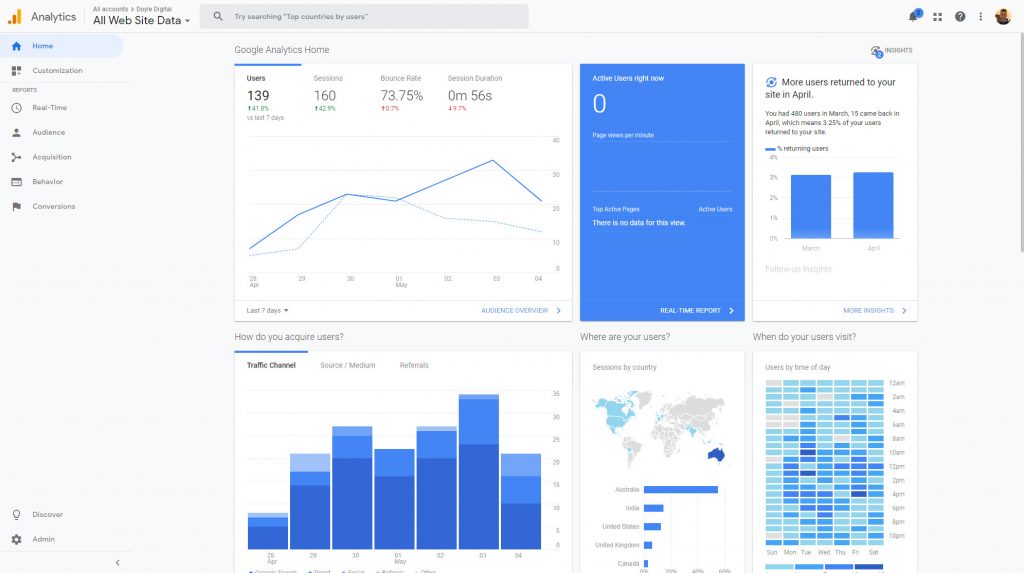
Once you’re logged into the right account, you should see a dashboard that looks similar to this:

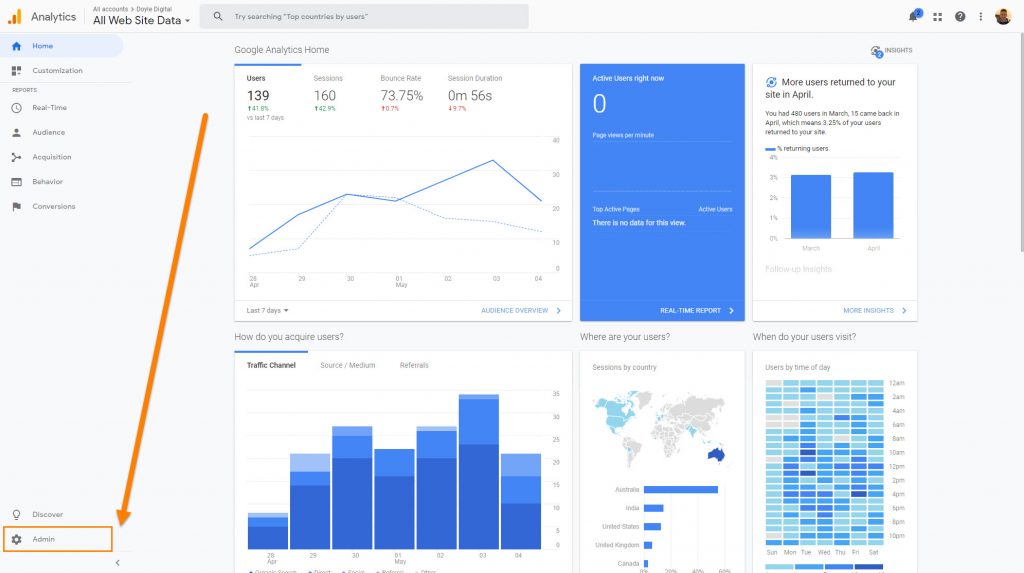
Step 2: Go To The Admin Panel

In the bottom left of your screen, there is a little cog icon with and the words “Admin”.

Click on that to go to the Admin Panel.

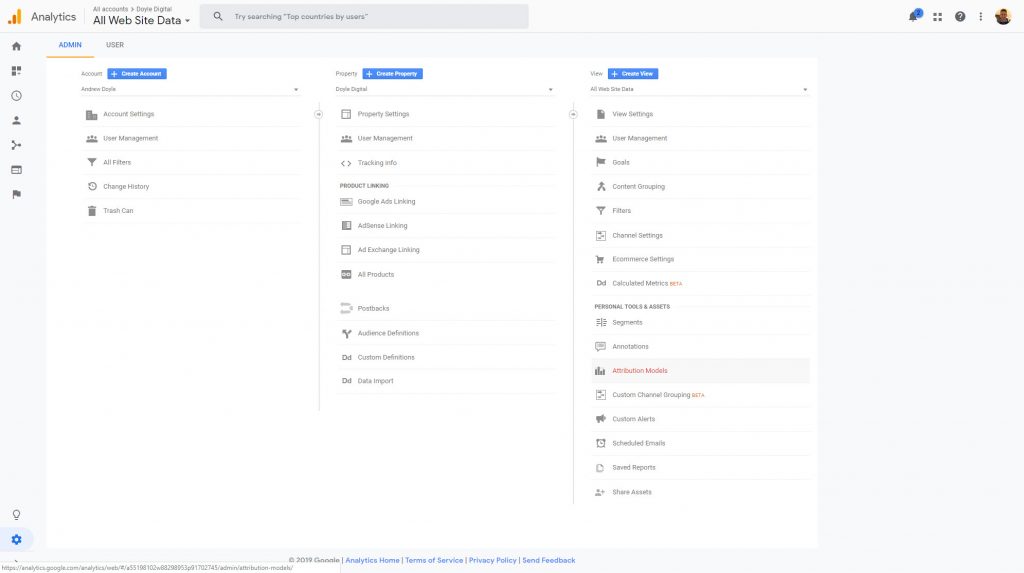
Once you’ve clicked on the Admin tab, you should see your Admin panel like so:

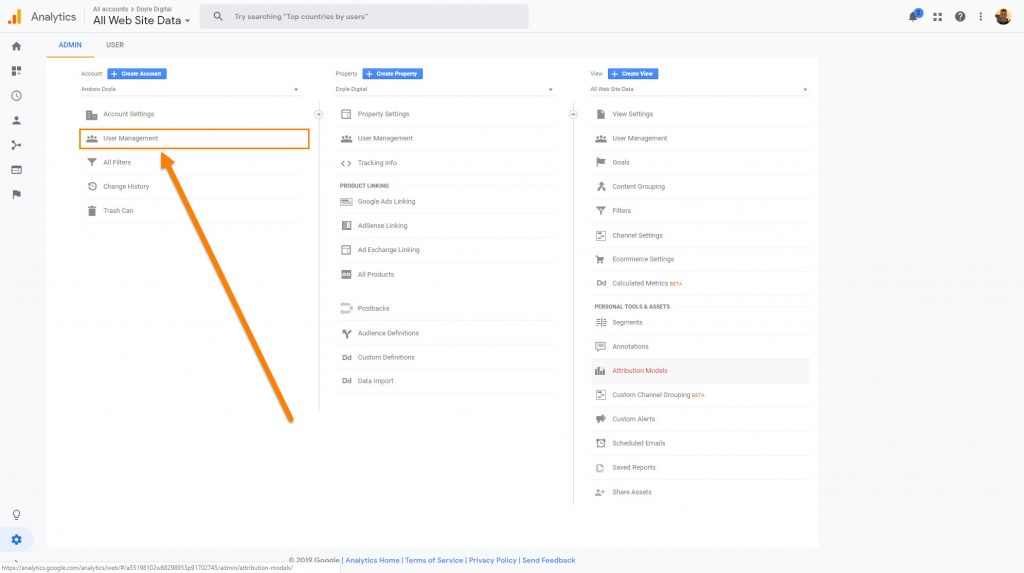
Step 3: Click User Management

You will see three different panels from left to right.

Account, Property and View.

Typically you will want to give access to the Property level at the bare minimum if you want a digital marketing provider to be able to do things such as link up your Google Ads account to your Google Analytics account.

In this example, we’re going to provide access to the Account level (which is the highest level of access to the account).

If you wish to provide access at the Property or View level, just click “User Management” under the Property panel or the View panel, respectively.

The steps going forward are exactly the same, regardless of which level you’re providing access to.

Step 4: Click Add Users

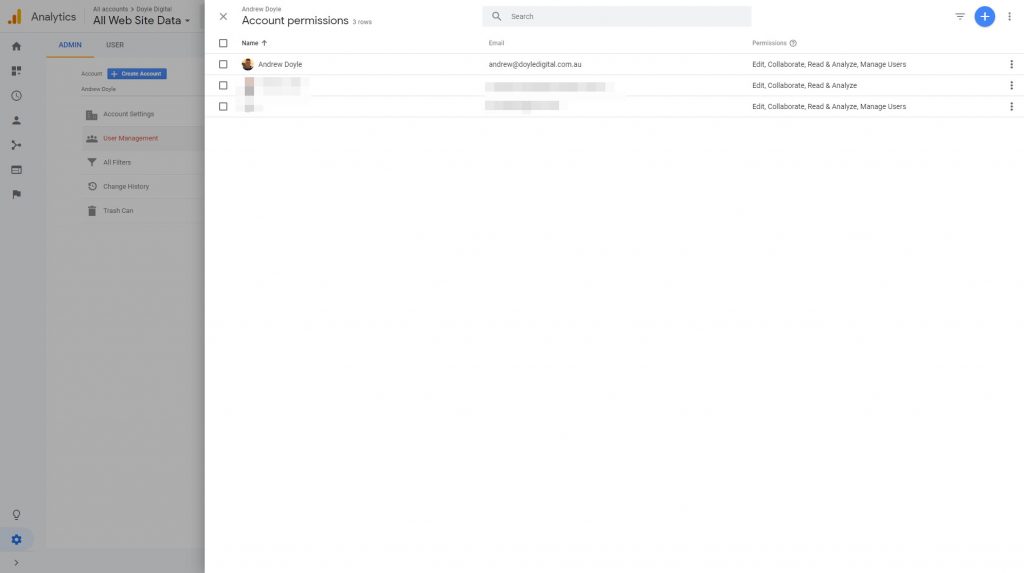
Once you’ve clicked on User Management (regardless of whether it was under Account, Property or View), you will be greeted with this screen:

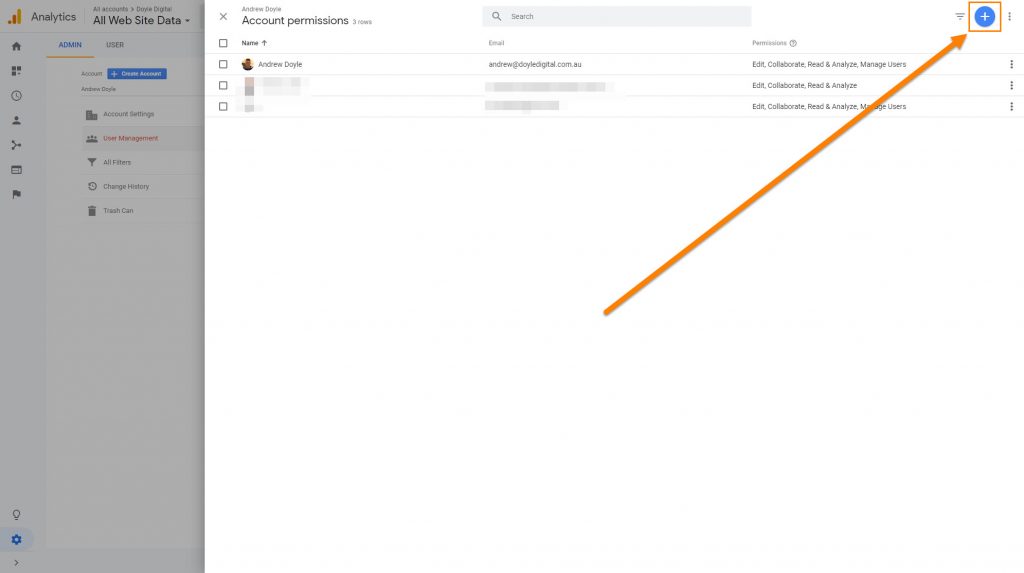
Now, there is a small blue circle in the top left with a white + on the middle.

We’re going to click on that:

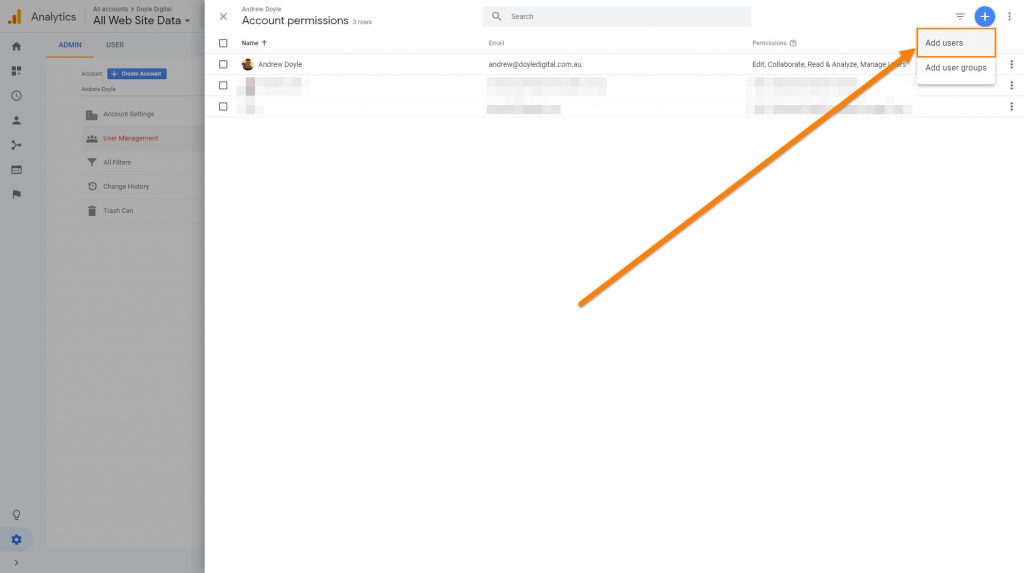
And on the little drop down box, we’ll click on “Add Users”

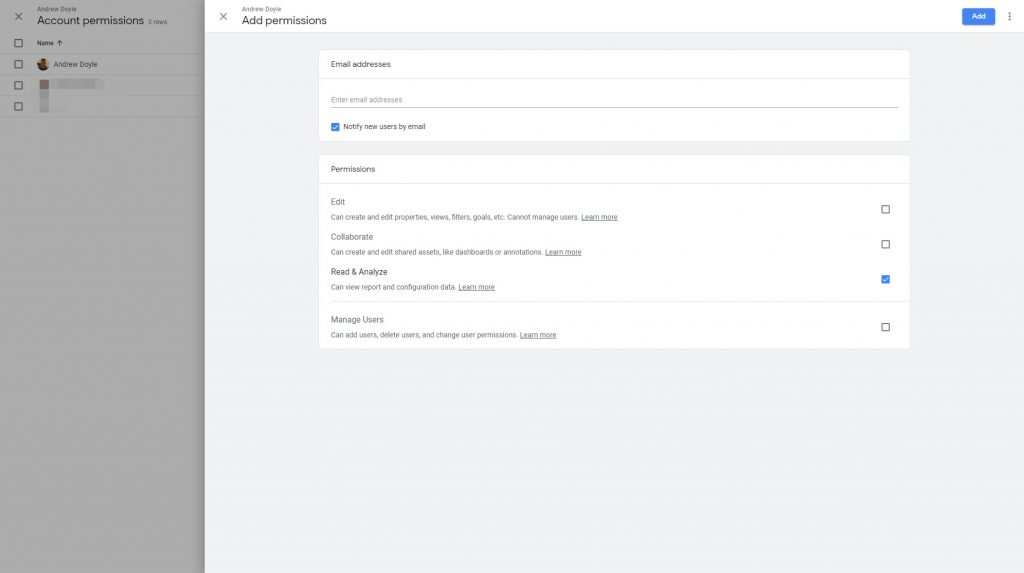
Step 5: Choose Permissions

Once you’ve clicked Add Users, you will be greeted with this screen:

This is where we need to pay attention a little bit to ensure we’re giving the right level of access here.

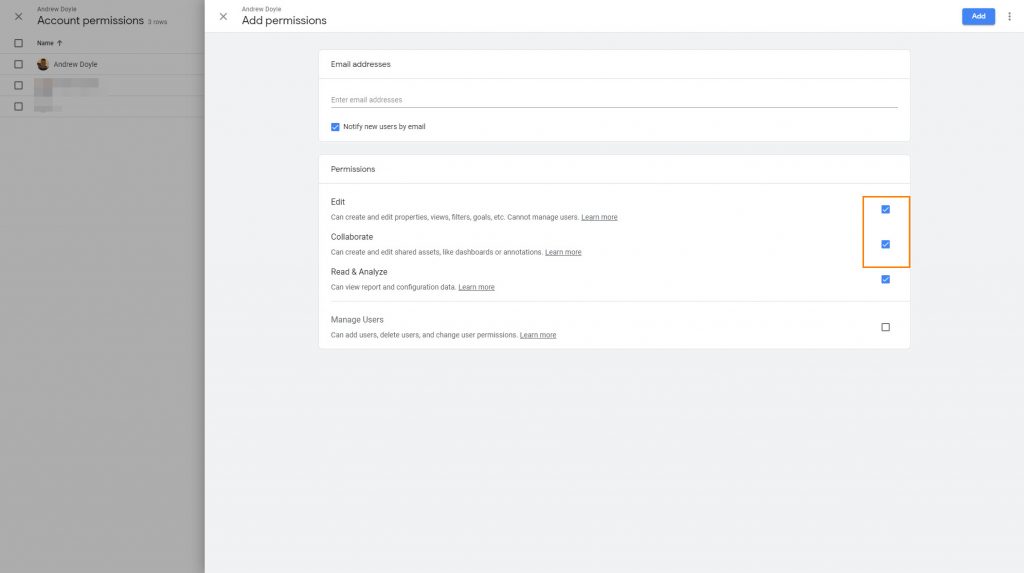
In most cases, you want to tick the “Edit” and “Collaborate” boxes which will allow your digital marketing provider to perform all the tasks that they need to.

Warning: If you click on the “Manage Users” box, you are giving this new user the ability to add any other users that they like and allows them to remove users, including yourself.

“Manage Users” at the Account level should only really be provided to people within your own organisation and not to external providers as a security measure.

Some SEO companies may demand full admin access. They don’t need it.

If an SEO claims that they need to have full admin access to access Google Search Console, there are other methods that they can use to claim it.

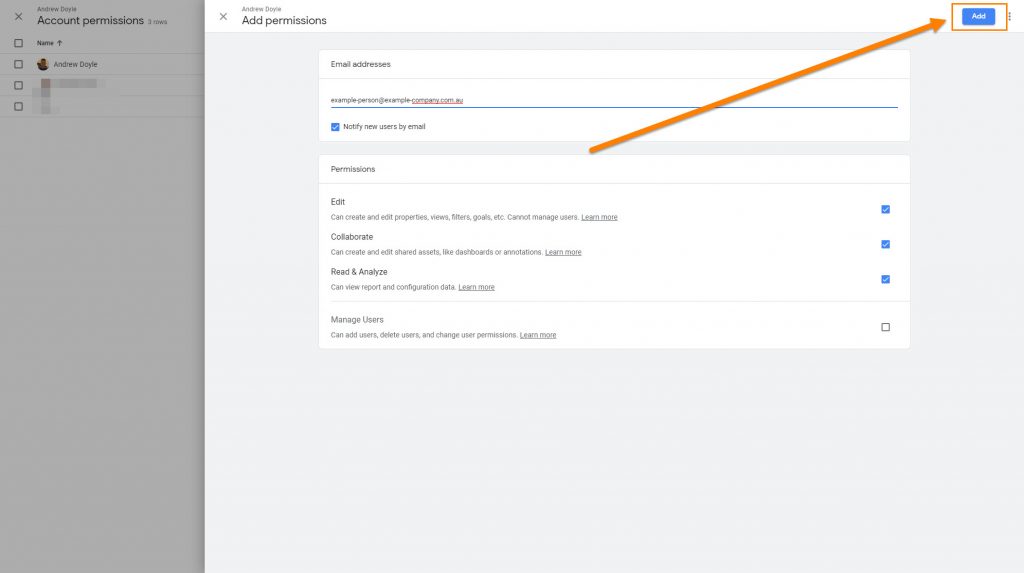
Step 6: Add E-Mail Address

Once you have selected which permissions you would like to provide, go ahead and enter their e-mail address in the line towards the top.

Once you have entered the e-mail address, you just need to click the “Add” button to finalise everything.

The “Add” button is at the top right of your screen.

Providing that there is a Google account associated with that e-mail address, that’s everything that you need to do to provide access to Google Analytics!

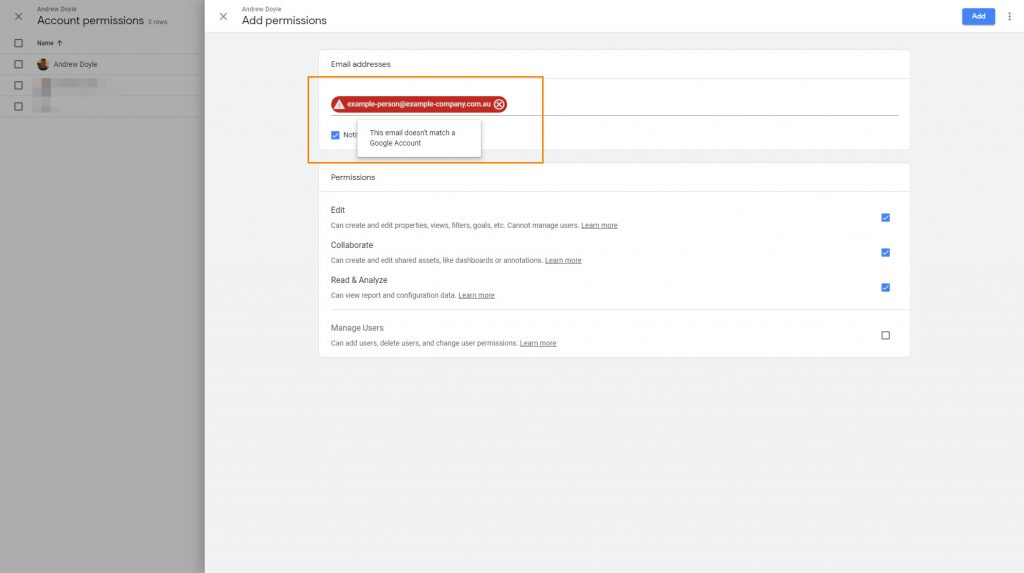
Error: This E-Mail Doesn’t Match A User Account

If you have entered an e-mail address and the e-mail address is surrounded in a red box, it can mean either one of two things.

  1. The e-mail address you entered may have been wrong or have typos
  2. The e-mail address doesn’t have a Google account associated with it

If there is no Google account associated with the e-mail address, the user will have to sign up to Google using that e-mail address.

You don’t have to create a Gmail address to sign up to Google.

Even if you have a Hotmail or business e-mail account, you can still sign up to Google’s services with that e-mail address.

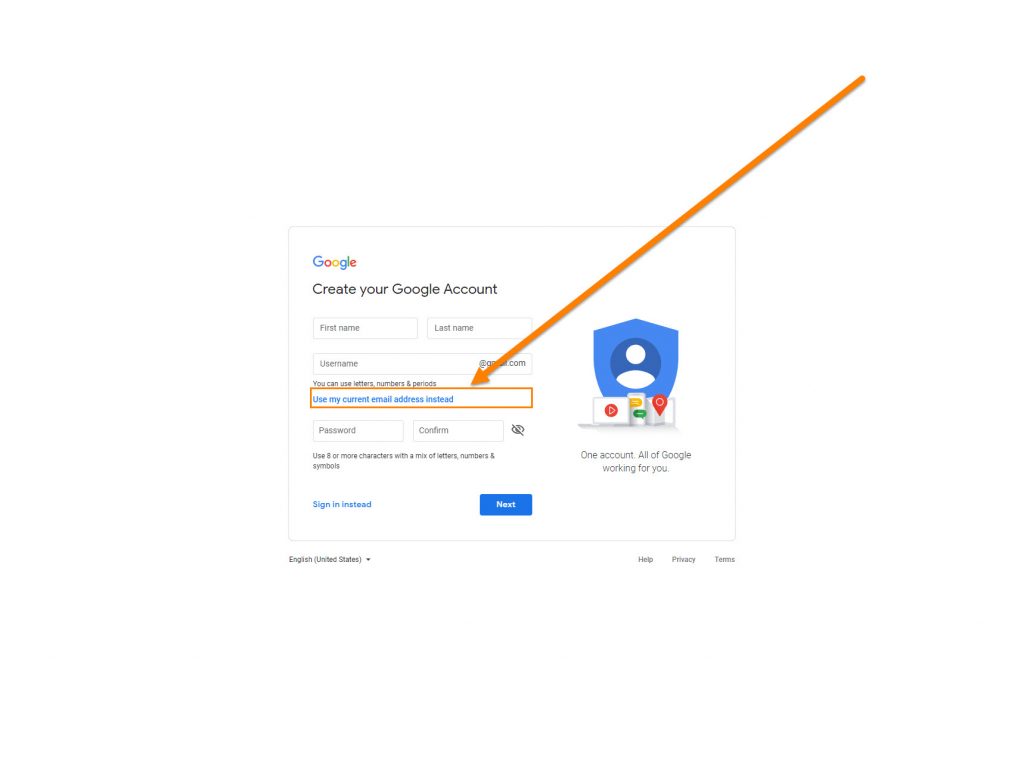
To sign up to a Google account with your existing e-mail address, follow the prompts to Sign In, Create An Account and then click here on the sign up page:

How to submit directory listings for SEO

2019 has barely started, yet the predictions of Voice Search, Augmented Reality, Virtual Reality and Artificial Intelligence pollute most marketing/advertising publications.

It’s amazing how much attention these things get by business owners, looking eagerly into the future whilst they’ve neglected the basics.

Those basics being their branding, their website, their online marketing, etc – which the vast majority of businesses here in Australia don’t have ironed out.

Yet they want to know more about these new technologies that are barely even around, let alone matured, advertiser-friendly medium ready to be capitalised on.

And much could be said for SEOs, always looking for the next big link-building hack that will send them flying up the Search Engine Results Page (SERPs) when they don’t have their link-building basics down-pat yet.

Back To Basics

Directory links are typically the first backlinks you will obtain either for yourself or for a client.

They’re the quickest and easiest way to build up some domain authority along with giving Google some consistent information regarding your business Name, Address and Phone number (commonly referred to as NAP information).

The thing is; no one seems to treat this initial phase with much respect.

As if it’s that annoying first task you have to get out of the way before you get to the “real backlink strategy”.

Done quickly and out of the way as quickly and with minimal effort as possible.

Directory Links Are Golden

Most of these ‘advanced backlink strategies’ used by agencies are Public Blog Networks (PBNs).

PBNs are basically websites that are devoted to creating content for the purpose of providing links to those willing to pay.

They’re not real websites. They’re not genuine references to your business. They’re not something that Google wants you to do.

Building directory backlinks, however, is always a safe and reliable source of links that Google will never punish you for.

Even before the purpose of directories became primarily for SEO purposes, every new business would go and list themselves in every free website that they could in order to increase their reach and exposure.

So, building as many directory listings as possible is highly encouraged.

But they need to be done right.

What Most Agencies Do

And look, I used to do this too.

They basically prepare 3 or 4 different variations of descriptions for ALL of the directories that they plan to submit to.

These descriptions would all be around 30-50 words long, which isn’t long enough.

But it used to work just fine.

And it was a more efficient use of time.

However, as time has gone past and Google’s algorithm continues to mature, I’ve noticed that directory listings just didn’t have the impact that they used to.

Until I tried something different…

Make the content all directory descriptions lengthier, with each listing’s content being completely unique.

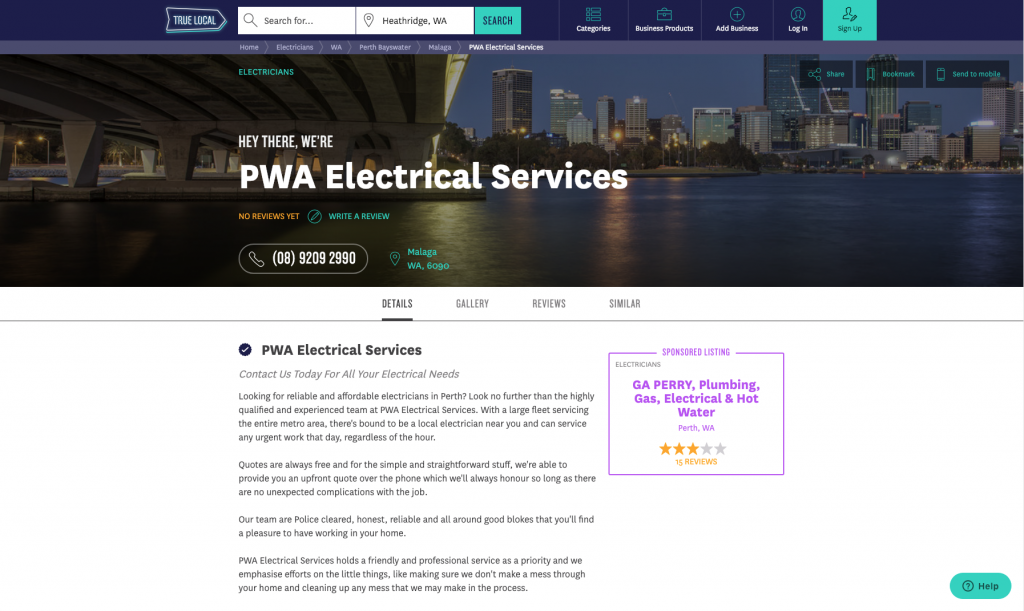
A directory link like this one below on TrueLocal for PWA Electrical Services will never run foul of Google’s algorithm.

This directory listing is filled out extensively with content that you won’t find on any other directory listing or on the PWA Electrical Services website.

Unique Content

Google hates duplicate content.

I’m sure you’ve done a search of some sort where you find yourself scrolling deeper into the search results, looking for something specific, and have seen this message in the SERP.

What lays beyond here is basically useless and discredited content, in Google’s eyes.

Which is where some of your directory listings will live if you’re going around, copying and pasting the same descriptions into all of the directories that you fill out.

In other words, if a directory listing of yours lives in they beyond (Google’s omitted results) then the link you’ve obtained from that directory listing is basically worthless.

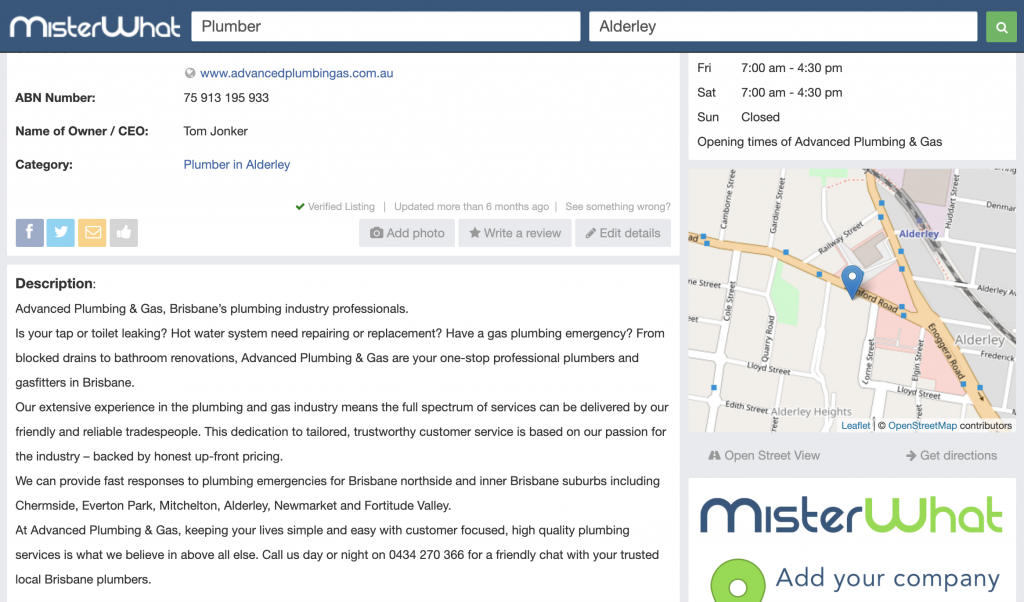
This is why, despite working with an SEO agency, Advanced Plumbing and Gas in Brisbane didn’t have much luck strengthening their backlink profile when they had the same content across all of their directory listings.

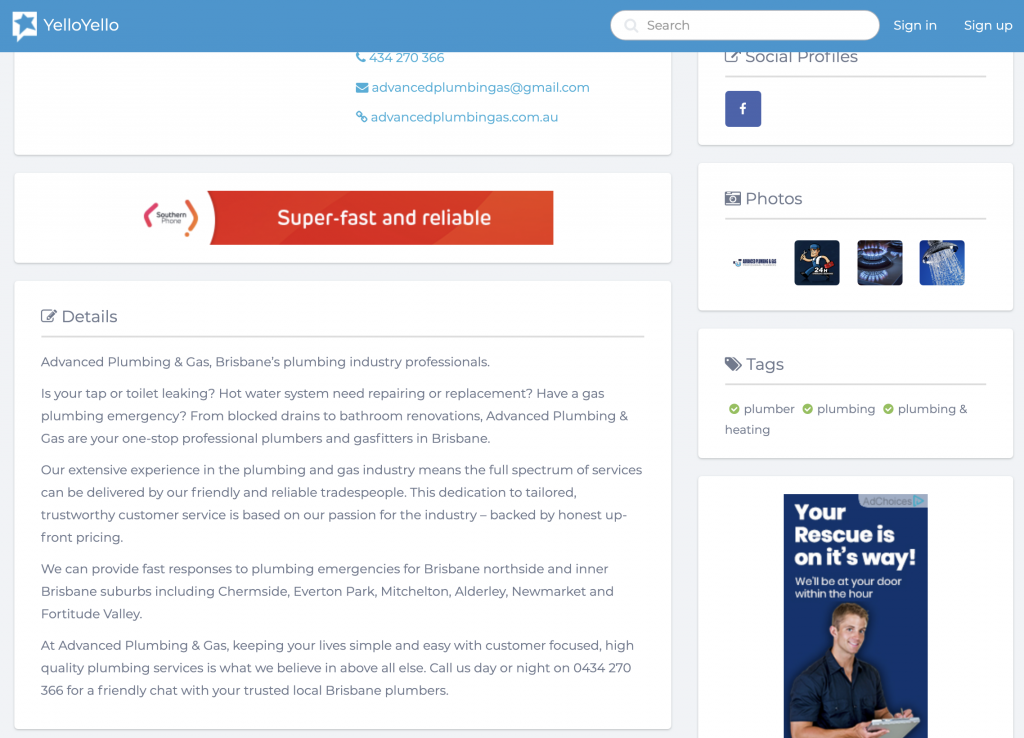
You can tell this agency has at least tried as the content above is actually quite good. But as you will see in the listing shown below – the content has been copied and pasted in the next directory listing (among all the other listings that this agency built).

Despite having filled out a lot of directory listing, this agency wasted their time trying to fill it these directories out and wasted an opportunity for their client to capitalise on the full (or any) value of these directory listings.

It’s a shame. Simple mistakes like this are committed by even some of the biggest agencies and it costs results.

It would have been better (although still not ideal) if they had a significantly lower word-count in their directory listings but at least made them unique descriptions.

Content That Makes Sense

There is no quick and easy (lazy) way to produce unique content on your directory listings.

So tools like content-spinners are not recommended – unless you’re okay with your content being at this level of quality:

Believe it or not, Google can actually read what’s written in the description of your directory listings.

And if Google can read lengthy, unique and highly relevant content about your website, it’s going to be a far more relevant (and powerful) link back to your website than the gibberish shown in the listing above.

On-Page Relevance

Writing not just unique content but trying to write lengthy content is the key to supercharging these directory listings.

See, every page in Google has a “theme”.

It’s a way to roughly know what category this content sits in.

It’s how Google figures out if content is relevant to electricians, to plumbers, to lawyers and so on.

By default, any page on a directory listing is going to fall in the “business directory” theme.

But if you can really bulk out the content on your listing’s page, you’re going to end up making the majority of the content on that page more relevant to your business and your industry.

That makes the link a lot more relevant to your business.

Meaning that you’ll have more relevant, industry related links pointing to your site if you can fill these directory listings out properly.

A Big Time Investment

Yes, this will suck up a lot of your time filling out directories.

Especially if you’re not the writing type.

But the directory listings are your backlink profile’s concrete slab.

It doesn’t matter what quality of bricks, plaster or roof tiles you have on top of that concrete slab, if it’s not strong, the whole house isn’t going to hold up very well.

So, invest the time or pay a copywriter to come up with multiple variations of lengthy and unique directory listing content.

Because it will be one of the best investments that you make in your long-term SEO strategy.

As Always, Take Security Seriously

As with anything that you do online, you always need to consider your security.

A couple of things I typically do is:

  • Use a separate e-mail account specifically for link-building to avoid your regular e-mails being bombarded with spam
  • Ensure your link-building e-mail has a password that is different to your regular e-mail addresses
  • When registering to directories, have a separate password for each one

Unfortunately, some of these less reputable directory websites get hacked or taken over and the information on those profiles can become compromised.

And because people tend to use the same or similar passwords for everything, attackers are able to use those passwords to gain access to your other online assets, doing damage or holding them ransom.

Keep Everything Recorded

It’s always handy to keep a spreadsheet of every website that you’ve submitted your business to along with the username, passwords and description that you’ve used for that directory.

That way, if you ever need to go back in and update anything you’ve got everything on hand to make life easy for yourself.

Should you give SEOs cPanel/FTP access?

Once you have signed up with an SEO provider and they’re setting the SEO campaign up, it’s not uncommon for them to request access to your Web Hosting logins, cPanel logins or FTP (File Transfer Protocol) details.

It’s an expected request, as placing or editing certain files on your server is necessary. However, this is sensitive information that grants a great deal of control over your digital assets (including, in most cases, your business e-mail accounts) to your provider.

It’s a big ask, especially since you’re likely only just at the beginning of this relationship with your SEO. It’s the same level of crazy as cutting a house key for someone you’ve been seeing for a week.

Why Do SEOs Need cPanel/FTP Access?

The common reasons that SEO’s will need to access your cPanel or have FTP access is to place files on your server, these files are more often than not:

  • Google verification file to manage your website in Google Search Console (formerly Webmaster Tools)
  • To edit you .htaccess file to create redirects or disallow bots from accessing certain pages of your website
  • To edit certain parts of the website that aren’t accessible through your Content Management System (CMS)

Typically, these are once off tasks that an SEO would need to do at the beginning of a campaign.

The Safest Approach

Every business who relies on their digital assets should have a relationship with a locally based IT professional.

It’s important to ensure these services are local so that they are held accountable by local consumer protection laws.

Because these the tasks where SEOs need your cPanel/FTP details are a once off; it’s best to have your SEO send these files to your IT provider who can then check the files and implement them on your server themselves.

Extra Tips For Your Digital Security

Ensure that you’re not giving more access to your SEO or digital marketing providers than is absolutely necessary.

A few ways to avoid the common mistakes that I often see clients making are:

Provide SEOs with their own login details for your website and not the main/administrator login details. Ensure that they don’t have access to edit core files such as the header/footers or function files.

Never give login details to your e-mail accounts, especially if they are connected with your domain name. Everything your digital marketing providers need access to (like Google Analytics or Google Ads) can be provided by inviting their e-mail address to the account as a manager (and not as an Owner).

Never give Manage Users access to Analytics. Giving Manage Users access means that they can add whoever they like and remove whoever they like from the account, including you. That historical data in Google Analytics is invaluable and you don’t want your account held ransom. Edit permissions is usually all an SEO provider needs.

Would These Measures Annoy My SEO?

More than likely.

Yes, it is far more convenient for us SEOs to have unrestricted access – it does make the job quicker and easier.

But ultimately, I’d respect any client’s wishes to ensure their digital assets are safe and as long as there are ways for me to complete the work, the inconvenience is far from unbearable.

Why Do You Need To Take These Measures?

Sadly, the digital marketing industry is highly unregulated.

That means the people who can call themselves digital marketing professionals are not required to achieve a certain level of education, credentials or adhere to any industry body before being able to pose as “experts”.

Some SEO companies have been known to put malicious code on client websites and even create additional entry points to the website, so they can still access it even if passwords have been changed or their logins removed.

This is done to ensure that the website starts to perform poorly if a client decides to leave, hoping that the client will return since there’s a clear correlation with leaving the SEO provider and things going bad.

I’ve even seen a client suddenly have problems with their e-mails after leaving their overseas provider as they had the client’s web hosting logins – it was a lot of work liaising with the hosting company to get all the passwords reset and to rectify everything.

Of course, these are worst-case scenarios. You do limit the potential of this happening with local providers, but it’s always good to ensure the security of your digital assets as they continue play a greater role in most business’ marketing communications.

Bidding on competitor names in Google Ads

Bidding on your competitor’s brand name is a great way to capitalise on traffic that you would never normally be exposed to.

Yes, bidding on competitors’ brand name perfectly okay/legal to do and it’s a strategy that I’d always highly recommend.

When done right, it’s a great source of cheap and highly qualified leads.

And there are some businesses that have just as much search volume for their brand name as your big-hitting non-branded keywords.

Just check out how many searches Orbit Fitness have for their brand name. It dwarfs some of the biggest geo-tagged fitness equipment related keywords.

A lot of the time, the people behind these searches are hot, ready to buy customers who aren’t particularly loyal to the company that they’re searching for.

Think of it like how some people will still say that they will “Hoover” the floors (with their Dyson).

If you’re able to present a better deal or a competitive advantage over the business that you’re targeting, you can pull a lot of opportunity your way.

So, competitors’ brand names can be a valuable source for additional traffic, leads and sales. Especially if you’re not currently hitting your daily budget in AdWords.

However, when done wrong, it can waste your budget at best, and land you in some really hot (even legal) water at worst.

Don’t Use Other Brand Names In Ads

Target your competitors’ brand names as keywords, for sure.

But don’t actually write ads where you write their brand name in.

Never. Ever.

Firstly, in your own interest, you’re just going to fool search users who are just going to bounce straight off your website, running up your daily budget with very little return.

Secondly, it’s a real d*ck move. It’s not going to help you get on with everyone in your industry.

Thirdly, there’s always the potential of legal action.

Just steer clear of that “strategy” all together.

Don’t Use Dynamic Keyword Insertions

So (hopefully) you know not to use your competitors’ brand names in your AdWords ads.

But you could end up displaying a competitor’s name in your ad without meaning to.

Despite how sh*t they are, some people are still using Dynamic Keyword Insertions (DKI) in their ads.

(Okay, DKI has it’s place in some large e-Commerce websites. But for most businesses, it’s a lazy way to try to provide relevancy in their ads).

If you don’t know how DKI works, basically, when you’re writing your ads you can use the {Keyword:Example} command.

As long as the Search Term that a search users looks for (and matches with your ad) fits the character limit of your ad, the “Example” part will be replaced with the Search Term.

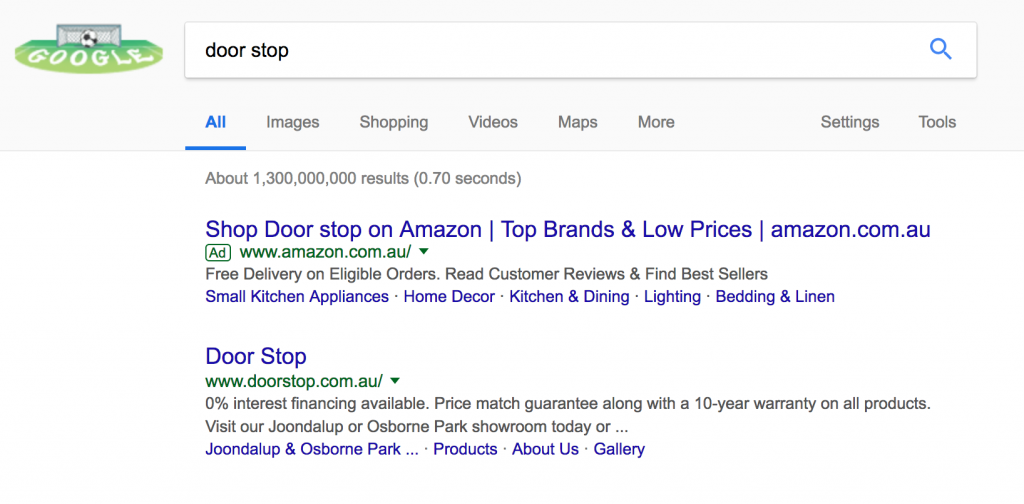
In the best case scenario, your ads will look pretty stupid like in this example below from Amazon, who would have written their Headline 1 like this:

“Shop {Keyword:Products} on Amazon”

The {Keyword:Prodcuts} has been replaced by my search term “door stop”, changing the Healine 1 to read:

“Shop Door stop on Amazon”

So you can see how in the worst scenario, one of your broad match keywords could end up matches with a competitor’s brand name.

And the Dynamic Keyword Insertion feature kicks in, displaying that competitor’s brand name loud and proud in your in your ad.

(Whilst I did manage to find an example of doing this, I thought it was best not to show the example and avoid calling someone’s business out).

Setting It Up Right

It’s always ideal to have a seperate Campaign for targeting your competitors.

Firstly, you can use your competitors’ brand names as negative keywords in your other campaigns so that they aren’t indirectly bidding on those terms through broad match keywords.

Then, in your Competitors Campaign, I would have a dedicated AdGroup for each competitor that you plan to target – making it easier to identify which competitor’s keywords are actually working for you.

Having a seperate budget for your Competitors Campaign is also a good way to ensure that your other Campaigns’ budget isn’t chewed up by this new one.

Writing Good Ads

Ensure you’re writing ads that boast a competitive advantage which your targeted competitor doesn’t have.

It’s also a good idea to ensure that your brand name (not your competitor’s) is very obviously stated in the ad copy.

Because if you don’t do that, the only identifier you have for your business is your URL (which a lot of people don’t always glance at).

A good example of an ad that is designed to be used with competitor’s brand names (without tricking or confusing anyone) is this one with Door Stop:

Door Stop haven’t mentioned their competitor’s name in the ad.

And whilst the word “better” is used, it requires the search user to put two and two together, and doesn’t explicitly state who their quality and prices are better than.

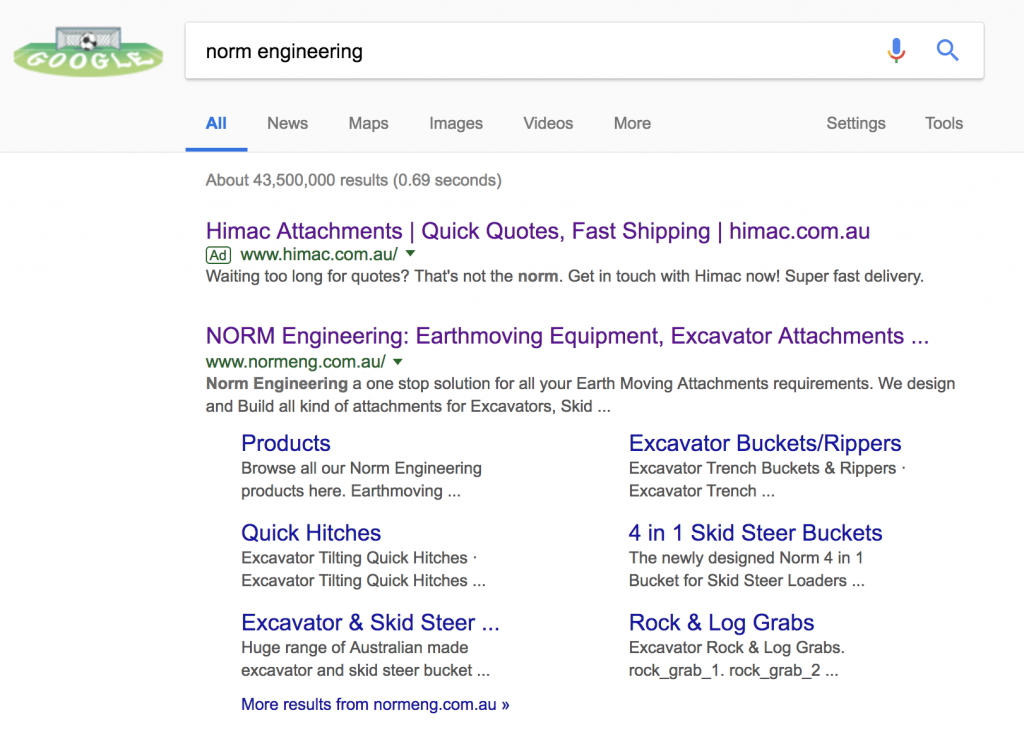
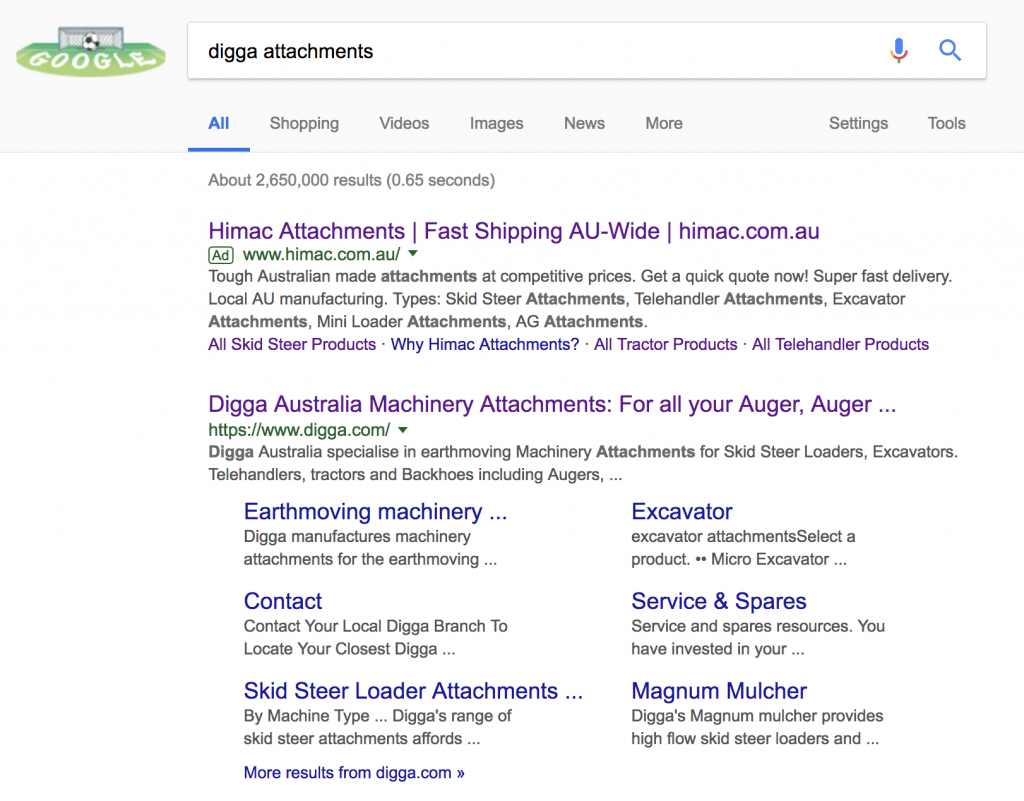
There’s also the opportunity to be a bit cheeky if the competitor’s brand name can be used naturally in a sentence, like Himac Attachments in this example:

This one just about gets away with murder here as luckily this competitor’s name can be used naturally. The fact that the word “norm” wasn’t capitalised also helps.

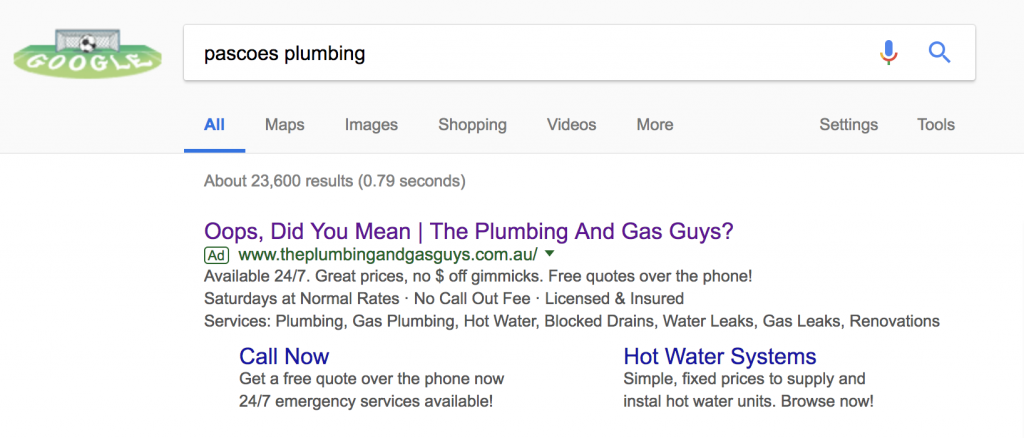
If you want to have a bit of fun but don’t have the chance to perform some word play on your competitor’s brand name, you can try something like what The Plumbing And Gas Guys did:

Or if you just want to play it safe, use an ad that you would typically use when bidding on your own brand name like so:

Monitor Performance

Always ensure that you’re tracking conversions with your AdWords campaigns – such as phone calls and enquiry forms filled.

Monitor your Competitors Campaign and its AdGroups closely and ensure that you’re pulling in leads at a reasonable cost.

If things are starting to look expensive, try lower your bidsrevise your ads to be more clear and/or look through the Search Terms report to see if there’s any keywords that are causing waste.

If, for whatever reason, you’re not seeing results from bidding on a particular competitor’s brand name – you may have to pause the AdGroup.

Don’t forget to segment data by device types when analysing, too.

Because there’s a chance that people searching on a mobile are looking for an address or phone number rather than researching.

So, you may get poorer results on mobile.

Or you may not.

That’s the beauty of AdWords.

Every Account is different so you’ll just have to see for yourself.