Is Blogging Good For SEO? Or Can It Do More Harm Than Good

After building ShutterCoWA‘s new website, we did what we do for every website that we launch – we monitor the Google rankings and make slight changes where necessary to ensure smooth sailing.

The issue we had with this website is that Google was continually swapping around the pages they had indexed for our main commercial-intent keywords.
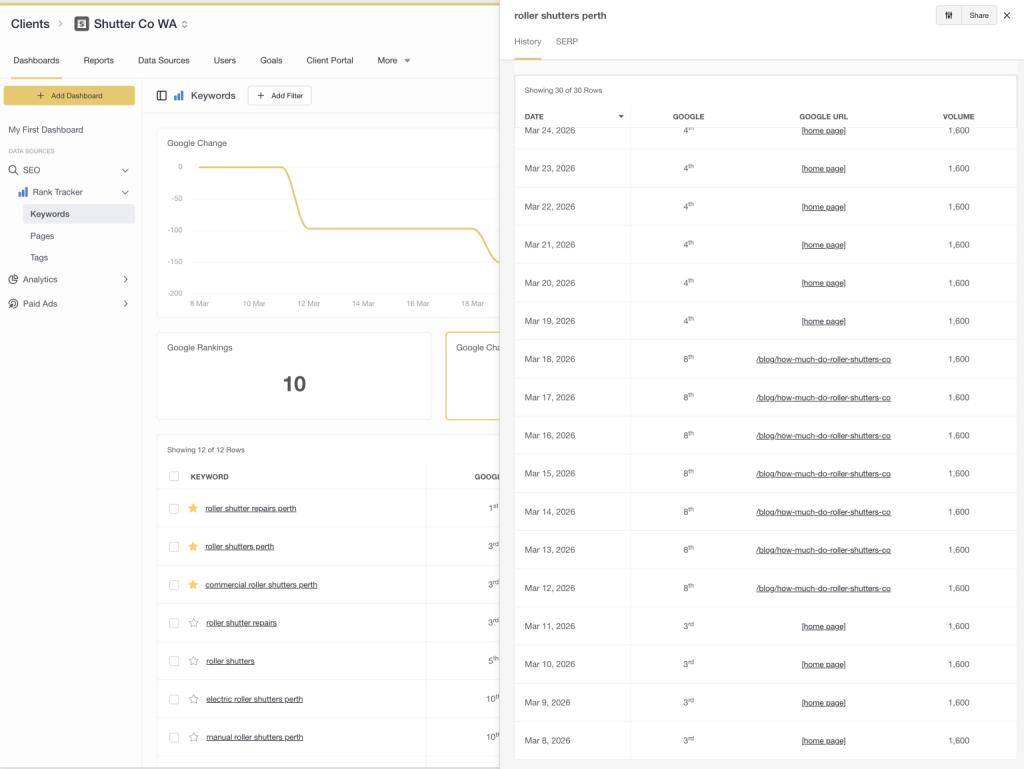
In order to fix this, we had to do a few things:

  • 301 redirect the blog posts causing confusion to the target page
  • Improve internal linking to indicate what the core page for this topic is
  • Fix up other blog posts that closely matched commercial serach intent before they too caused issues

Had these issues gone un-noticed and not fixed, it would have severly impacted both their SEO long-term as well a drop in genuine enquiries (potentially resulting in tens of thousands of dollars worth of missed opportunities).

Blogs Have Been Marketed By Agencies

For years, blogging has been pushed as a “must-do” for Search Engine Optimisation.
More blogs = more keywords = more traffic… right?
Well…as the great saying in SEO goes; “it depends”.
In an age where SEO has become more complicated, a lot of agencies have resorted to populating blogs in order to justify their retainers.
The problem is that a lot of these agencies are just adapting to the market and don’t actually know what they’re doing.
Blogging done the wrong way can actively hold your website back
Let’s break down where things go wrong, and how to actually use blogging to strengthen your SEO instead of sabotaging it.

The Problem: Blogs Competing With Your Money Pages

One of the most common mistakes we see is businesses using blog posts to target their main commercial keywords.
Things like:

  • “Plumber Perth”
  • “Air Conditioning Installation Perth”
  • “Roller Shutters Perth”

On the surface, it feels logical. More content around those keywords should help… right?
But here’s the issue.
When you create multiple pages targeting the same intent, you’re not strengthening your SEO – you’re splitting it.
Instead of one strong, clear signal to Google, you’re giving it multiple options and saying:
“You figure out which one matters.”
And often, Google gets it wrong.

What Actually Happens (And Why It Hurts Rankings)

When blog posts target your core service keywords, a few things tend to happen:

1. Keyword Cannibalisation

Your blog and your service page start competing against each other.

Neither becomes as strong as it could be because authority is split.

2. Diluted Relevance

Your main service page is supposed to be your strongest, most focused page for that keyword.

But if you’ve got multiple blogs loosely targeting the same topic, Google starts to lose confidence in which page is the “real” one.

3. The Wrong Page Gets Indexed

Sometimes Google will rank your blog instead of your service page.

Sounds fine… until you realise:

Blogs don’t convert nearly as well
They’re not structured to sell
They often miss key trust signals

So you end up with traffic but fewer enquiries.

4. Slower SEO Progress

Instead of building one powerful page that climbs rankings, you’re spreading effort across multiple weaker ones.

It’s the difference between one strong signal and multiple, mixed signals.

So… Should You Avoid Blogging?

Blogging is still incredibly powerful for SEO when it’s used properly.

The key is understanding the role blogs should play.

What Blogging Should Be Used For Instead

Rather than targeting your main commercial keywords, blogs should focus on:

Informational & Research-Based Searches

These are the types of queries people search before they’re ready to buy:

  • “Is upgraded air conditioner ducting worth it for Perth summers?”
  • “Why is my roller shutter stuck?”
  • “How often should I service my car?”

These searches will show Google that you’re an authority on the topic, especially if you’re generating good user metrics.

You will likely attract traffic for a lot of out-of-area visitors – it doesn’t matter. These pages are not designed to sell, they’re designed to inform and position your business as an authority which helps life the trust of your entire business/domain.

Your blog content should act like support beams for your main service pages.

Each blog should:

  • Target a specific question or niche topic
  • Internally link back to your main service page
  • Reinforce your authority around that service

Over time, this builds a clear structure:

  • Service page: Sales page
  • Blogs: Supporting content

The Real SEO Play: Topic Clusters

This is where things start to click.

Instead of random blogs, you build a structured content ecosystem.

For example:

Main Page:

  • Air Conditioning Perth

Supporting Blogs:

  • How much does air conditioning cost in Perth?
  • Split system vs ducted: what’s more suitable for Perth?
  • 5 signs you need a new air conditioner
  • How long does aircon installation take?

Each of these blogs links back to the main page.

Now, instead of competing pages, you’ve created a network that tells Google:

“This main page is the authority and all of this content supports it.”

Internal Linking Is Where the Magic Happens

A blog on its own doesn’t do much.

A blog that links strategically? That’s where SEO starts to compound.

Every supporting article should naturally guide users back to your core pages.

Not forced. Not spammy. Just logical.

For example:

If someone is reading about air conditioning costs, it makes perfect sense to direct them toward your installation service.

This helps users take the next step, passes SEO value to your main pages and reinforces page hierarchy in Google’s eyes

The Bottom Line

Blogging isn’t about pumping out content for the sake of it.

And it’s definitely not about chasing the same commercial keywords across multiple pages.

Done wrong, it creates confusion, weakens your rankings, and brings in the wrong kind of traffic.

Done right, it strengthens your entire website.

A Better Way to Think About Blogging

Your website should work like a well-structured sales system:

Core pages are built to rank and convert.
Blogs are built to educate, attract, and support.

When those two work together, everything becomes clearer:

  • Clear signals to Google
  • Stronger rankings for the pages that matter
  • Better quality leads

How to submit directory listings for SEO

2019 has barely started, yet the predictions of Voice Search, Augmented Reality, Virtual Reality and Artificial Intelligence pollute most marketing/advertising publications.

It’s amazing how much attention these things get by business owners, looking eagerly into the future whilst they’ve neglected the basics.

Those basics being their branding, their website, their online marketing, etc – which the vast majority of businesses here in Australia don’t have ironed out.

Yet they want to know more about these new technologies that are barely even around, let alone matured, advertiser-friendly medium ready to be capitalised on.

And much could be said for SEOs, always looking for the next big link-building hack that will send them flying up the Search Engine Results Page (SERPs) when they don’t have their link-building basics down-pat yet.

Back To Basics

Directory links are typically the first backlinks you will obtain either for yourself or for a client.

They’re the quickest and easiest way to build up some domain authority along with giving Google some consistent information regarding your business Name, Address and Phone number (commonly referred to as NAP information).

The thing is; no one seems to treat this initial phase with much respect.

As if it’s that annoying first task you have to get out of the way before you get to the “real backlink strategy”.

Done quickly and out of the way as quickly and with minimal effort as possible.

Directory Links Are Golden

Most of these ‘advanced backlink strategies’ used by agencies are Public Blog Networks (PBNs).

PBNs are basically websites that are devoted to creating content for the purpose of providing links to those willing to pay.

They’re not real websites. They’re not genuine references to your business. They’re not something that Google wants you to do.

Building directory backlinks, however, is always a safe and reliable source of links that Google will never punish you for.

Even before the purpose of directories became primarily for SEO purposes, every new business would go and list themselves in every free website that they could in order to increase their reach and exposure.

So, building as many directory listings as possible is highly encouraged.

But they need to be done right.

What Most Agencies Do

And look, I used to do this too.

They basically prepare 3 or 4 different variations of descriptions for ALL of the directories that they plan to submit to.

These descriptions would all be around 30-50 words long, which isn’t long enough.

But it used to work just fine.

And it was a more efficient use of time.

However, as time has gone past and Google’s algorithm continues to mature, I’ve noticed that directory listings just didn’t have the impact that they used to.

Until I tried something different…

Make the content all directory descriptions lengthier, with each listing’s content being completely unique.

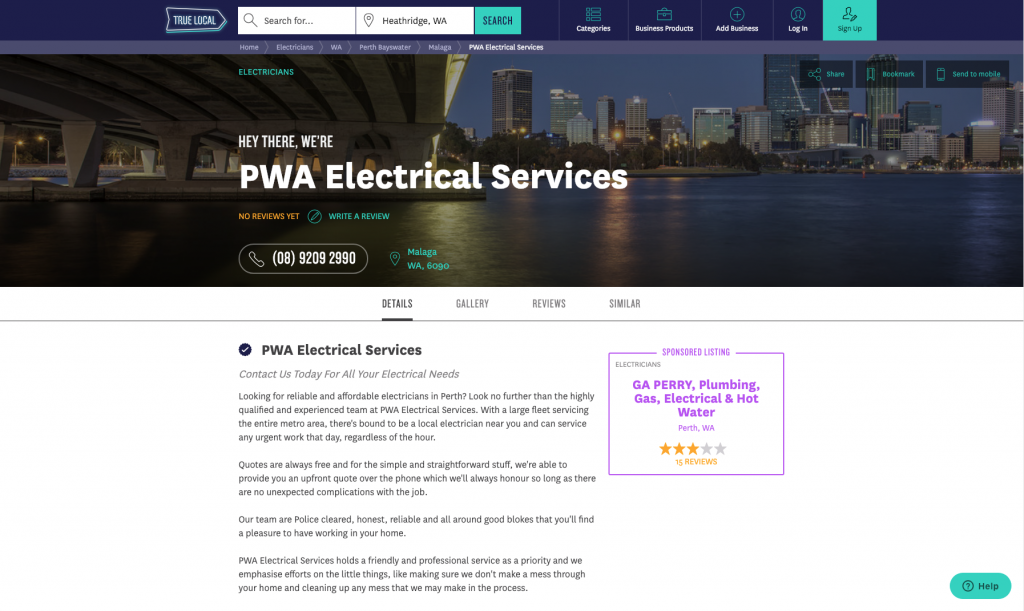
A directory link like this one below on TrueLocal for PWA Electrical Services will never run foul of Google’s algorithm.

This directory listing is filled out extensively with content that you won’t find on any other directory listing or on the PWA Electrical Services website.

Unique Content

Google hates duplicate content.

I’m sure you’ve done a search of some sort where you find yourself scrolling deeper into the search results, looking for something specific, and have seen this message in the SERP.

What lays beyond here is basically useless and discredited content, in Google’s eyes.

Which is where some of your directory listings will live if you’re going around, copying and pasting the same descriptions into all of the directories that you fill out.

In other words, if a directory listing of yours lives in they beyond (Google’s omitted results) then the link you’ve obtained from that directory listing is basically worthless.

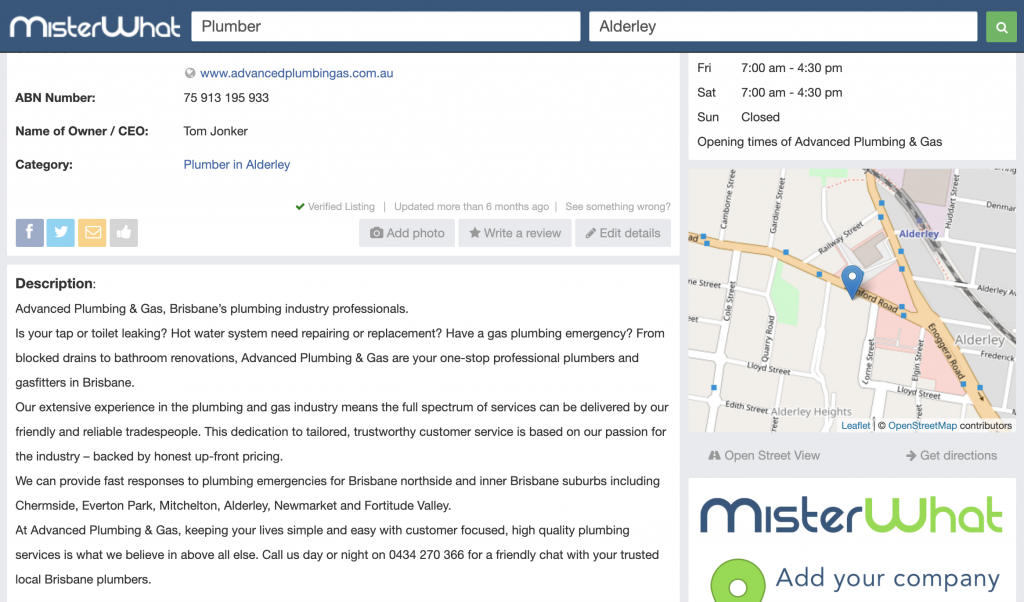
This is why, despite working with an SEO agency, Advanced Plumbing and Gas in Brisbane didn’t have much luck strengthening their backlink profile when they had the same content across all of their directory listings.

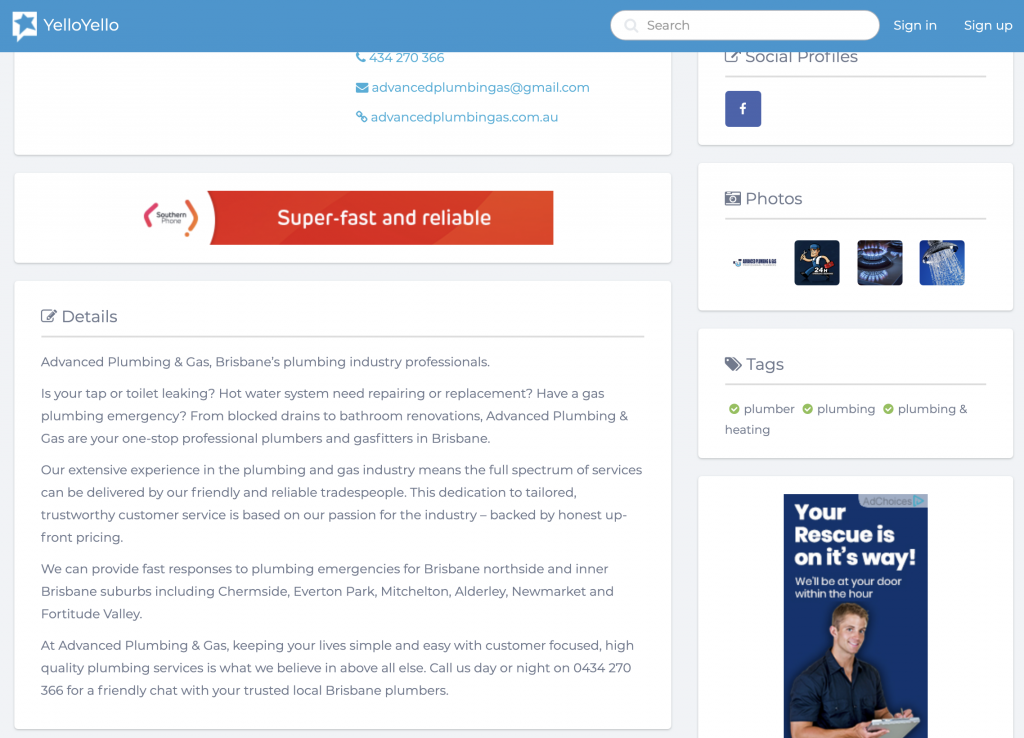
You can tell this agency has at least tried as the content above is actually quite good. But as you will see in the listing shown below – the content has been copied and pasted in the next directory listing (among all the other listings that this agency built).

Despite having filled out a lot of directory listing, this agency wasted their time trying to fill it these directories out and wasted an opportunity for their client to capitalise on the full (or any) value of these directory listings.

It’s a shame. Simple mistakes like this are committed by even some of the biggest agencies and it costs results.

It would have been better (although still not ideal) if they had a significantly lower word-count in their directory listings but at least made them unique descriptions.

Content That Makes Sense

There is no quick and easy (lazy) way to produce unique content on your directory listings.

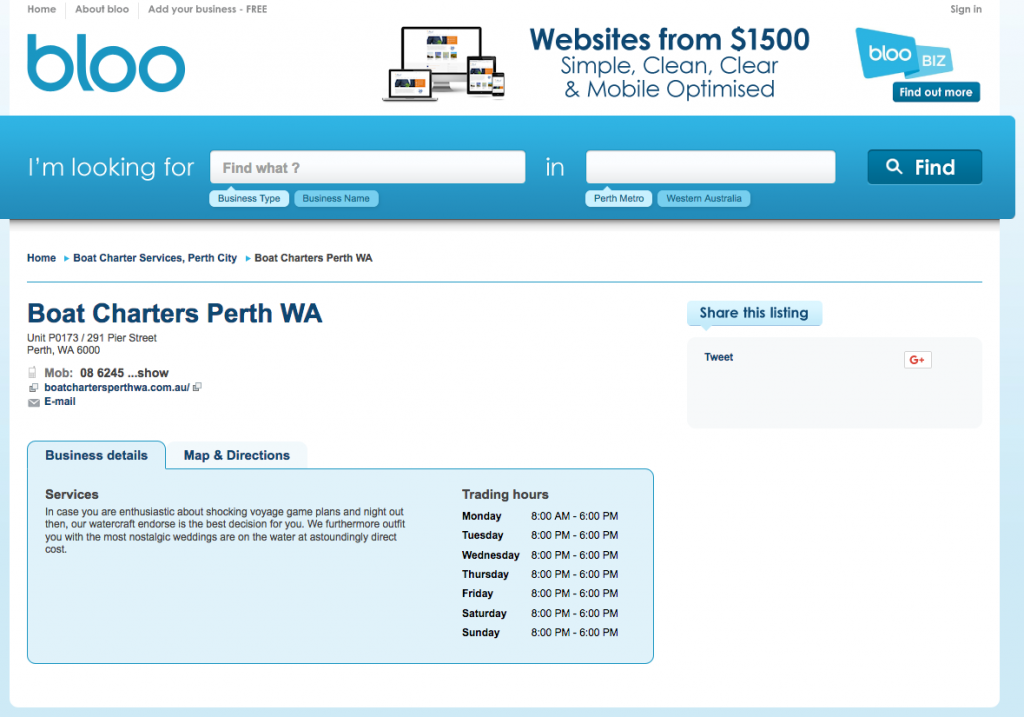
So tools like content-spinners are not recommended – unless you’re okay with your content being at this level of quality:

Believe it or not, Google can actually read what’s written in the description of your directory listings.

And if Google can read lengthy, unique and highly relevant content about your website, it’s going to be a far more relevant (and powerful) link back to your website than the gibberish shown in the listing above.

On-Page Relevance

Writing not just unique content but trying to write lengthy content is the key to supercharging these directory listings.

See, every page in Google has a “theme”.

It’s a way to roughly know what category this content sits in.

It’s how Google figures out if content is relevant to electricians, to plumbers, to lawyers and so on.

By default, any page on a directory listing is going to fall in the “business directory” theme.

But if you can really bulk out the content on your listing’s page, you’re going to end up making the majority of the content on that page more relevant to your business and your industry.

That makes the link a lot more relevant to your business.

Meaning that you’ll have more relevant, industry related links pointing to your site if you can fill these directory listings out properly.

A Big Time Investment

Yes, this will suck up a lot of your time filling out directories.

Especially if you’re not the writing type.

But the directory listings are your backlink profile’s concrete slab.

It doesn’t matter what quality of bricks, plaster or roof tiles you have on top of that concrete slab, if it’s not strong, the whole house isn’t going to hold up very well.

So, invest the time or pay a copywriter to come up with multiple variations of lengthy and unique directory listing content.

Because it will be one of the best investments that you make in your long-term SEO strategy.

As Always, Take Security Seriously

As with anything that you do online, you always need to consider your security.

A couple of things I typically do is:

  • Use a separate e-mail account specifically for link-building to avoid your regular e-mails being bombarded with spam
  • Ensure your link-building e-mail has a password that is different to your regular e-mail addresses
  • When registering to directories, have a separate password for each one

Unfortunately, some of these less reputable directory websites get hacked or taken over and the information on those profiles can become compromised.

And because people tend to use the same or similar passwords for everything, attackers are able to use those passwords to gain access to your other online assets, doing damage or holding them ransom.

Keep Everything Recorded

It’s always handy to keep a spreadsheet of every website that you’ve submitted your business to along with the username, passwords and description that you’ve used for that directory.

That way, if you ever need to go back in and update anything you’ve got everything on hand to make life easy for yourself.

Should you give SEOs cPanel/FTP access?

Once you have signed up with an SEO provider and they’re setting the SEO campaign up, it’s not uncommon for them to request access to your Web Hosting logins, cPanel logins or FTP (File Transfer Protocol) details.

It’s an expected request, as placing or editing certain files on your server is necessary. However, this is sensitive information that grants a great deal of control over your digital assets (including, in most cases, your business e-mail accounts) to your provider.

It’s a big ask, especially since you’re likely only just at the beginning of this relationship with your SEO. It’s the same level of crazy as cutting a house key for someone you’ve been seeing for a week.

Why Do SEOs Need cPanel/FTP Access?

The common reasons that SEO’s will need to access your cPanel or have FTP access is to place files on your server, these files are more often than not:

  • Google verification file to manage your website in Google Search Console (formerly Webmaster Tools)
  • To edit you .htaccess file to create redirects or disallow bots from accessing certain pages of your website
  • To edit certain parts of the website that aren’t accessible through your Content Management System (CMS)

Typically, these are once off tasks that an SEO would need to do at the beginning of a campaign.

The Safest Approach

Every business who relies on their digital assets should have a relationship with a locally based IT professional.

It’s important to ensure these services are local so that they are held accountable by local consumer protection laws.

Because these the tasks where SEOs need your cPanel/FTP details are a once off; it’s best to have your SEO send these files to your IT provider who can then check the files and implement them on your server themselves.

Extra Tips For Your Digital Security

Ensure that you’re not giving more access to your SEO or digital marketing providers than is absolutely necessary.

A few ways to avoid the common mistakes that I often see clients making are:

Provide SEOs with their own login details for your website and not the main/administrator login details. Ensure that they don’t have access to edit core files such as the header/footers or function files.

Never give login details to your e-mail accounts, especially if they are connected with your domain name. Everything your digital marketing providers need access to (like Google Analytics or Google Ads) can be provided by inviting their e-mail address to the account as a manager (and not as an Owner).

Never give Manage Users access to Analytics. Giving Manage Users access means that they can add whoever they like and remove whoever they like from the account, including you. That historical data in Google Analytics is invaluable and you don’t want your account held ransom. Edit permissions is usually all an SEO provider needs.

Would These Measures Annoy My SEO?

More than likely.

Yes, it is far more convenient for us SEOs to have unrestricted access – it does make the job quicker and easier.

But ultimately, I’d respect any client’s wishes to ensure their digital assets are safe and as long as there are ways for me to complete the work, the inconvenience is far from unbearable.

Why Do You Need To Take These Measures?

Sadly, the digital marketing industry is highly unregulated.

That means the people who can call themselves digital marketing professionals are not required to achieve a certain level of education, credentials or adhere to any industry body before being able to pose as “experts”.

Some SEO companies have been known to put malicious code on client websites and even create additional entry points to the website, so they can still access it even if passwords have been changed or their logins removed.

This is done to ensure that the website starts to perform poorly if a client decides to leave, hoping that the client will return since there’s a clear correlation with leaving the SEO provider and things going bad.

I’ve even seen a client suddenly have problems with their e-mails after leaving their overseas provider as they had the client’s web hosting logins – it was a lot of work liaising with the hosting company to get all the passwords reset and to rectify everything.

Of course, these are worst-case scenarios. You do limit the potential of this happening with local providers, but it’s always good to ensure the security of your digital assets as they continue play a greater role in most business’ marketing communications.

Why does SEO take so long?

Think of this – you’re driving on the freeway and you want to be ahead of someone that left an hour before you.

They’re already up to their maximum speed of 100km/h and are miles in front.

So, not only do you have to catch up to the speed that they’re doing, but also go a little bit faster.

Now wait, before you go pedal to the metal, remember that you can’t get caught by the Police!

*WOOP* *WOOP*

They’ll pull you up straight away if they catch you screaming down the freeway at 200km/h.

That’s basically your situation in Google when you’re trying to climb in Organic rankings.

Ranking in Google genuinely takes time.

It’s not just a line that all SEO companies use to try and bleed you out over time.

Even if you’re doing awesome work, there’s a few things that will prevent you from a meteoric rise to the top of the G-pile.

Quality Of SEO Work

Obviously, the quality of SEO work performed on your website is going to be a major factor between how quick and effective your SEO is going to be.

And for most business owners, being able to tell whether or not they’re getting quality SEO is a challenge.

Especially since most SEO agencies are pretty keen to keep their “formula” a secret.

Explaining what quality SEO work is is another series of blog posts on its own.

But basically, you need to ensure that your provider is optimising and adding content on your website (on-page work), and building good quality links to your website (off-page work).

Yet, even with quality work, SEO can still genuinely take time.

Below are a few contributing factors that are often outside of all SEO’s control.

Domain Age

Ever had a new guy come into the workplace and act as if he’s been a part of the team for years almost immediately?

Yeah, no one likes that guy.

And neither does Google.

If your domain has only just been registered and you’ve whacked a website on there, don’t expect the same respect as the old timers who have some solid history behind them.

At least not straight away, anyway.

There is typically a sandbox period that Google gives websites that can last anywhere from a month to a few months.

Your Industry

There are some industries where the level of investment to SEO is so low that ranking a website within a month (with exception to the “sandbox” mentioned in Domain Age) is actually a real possibility.

Then there are industries like law, where firms are throwing money around to get to the top of the Search Engine Results Page (SERP) and ranking for major keywords can take a full year or more depending on how aggressive the competition is.

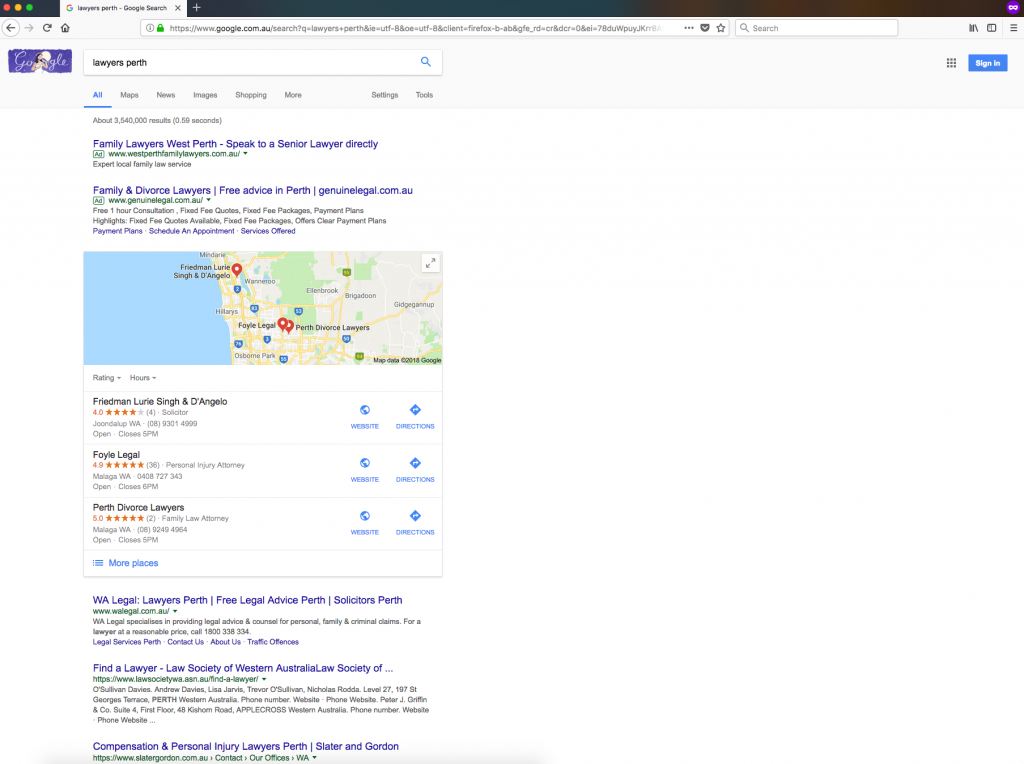
It took me just over a year to get WA Legal to rank ahead of some big names for the term “lawyers perth”.

Results Get Slower Over Time

Going back to our freeway analogy again, if we’re driving at 105km/h; we’re going to overtake the plebs travelling at 90km/h in the loser lane pretty quickly.

That means if your website is on page 10 when you start doing SEO then you’re likely to feel the NOS kick in as you scream up to page 4.

But you’re not going to keep passing cars at that pace because the cars that are ahead of the pack you just passed aren’t travelling at 90, those guys are cruising along at 100.

Provided you maintain your speed, you’ll get past them. It will just take longer to catch up and overtake.

Suddenly you’re on page 1…

Now you’re trying to overtake the cars that are doing 104km.

Slowly, but surely, you hit the middle of page 1.

Now here’s where things get tricky.

The cars in front are going the same speed as you are, fluctuating under and over by a km/h either side.

It will feel like you’re making no progress at all at point.

Then suddenly you’ll overtake someone, getting from position 4 to position 3.

Then you may see yourself slipping back down to position 4.

Then back up to position 3 again.

I think by now you get where I’m going with this. The higher you are, the tougher the competition is going to be and it will feel like the results are ‘tapering off’.

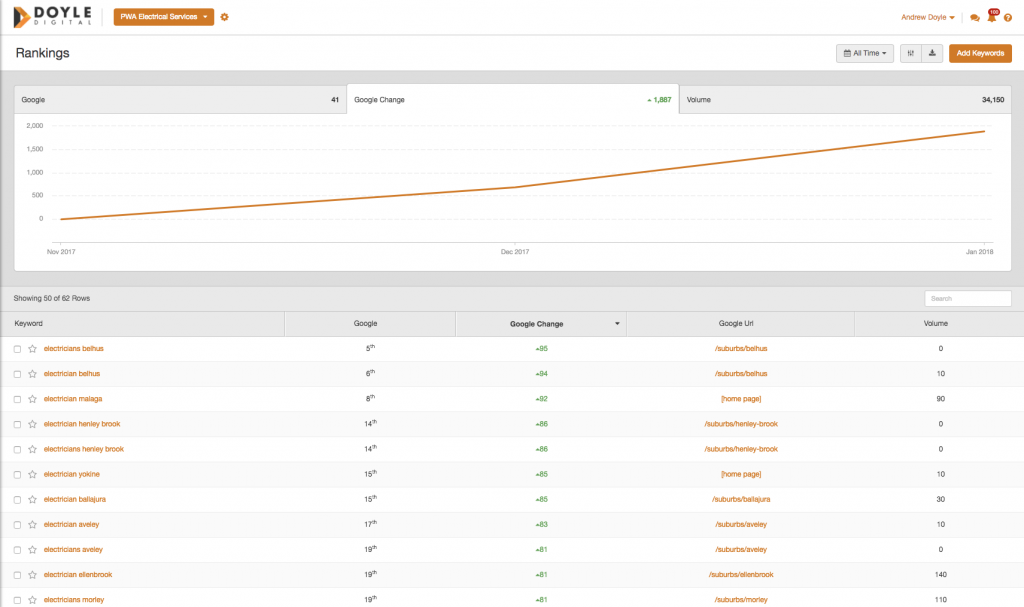
Using PWA Electrical Services as an example, you can see how within a month they’ve come from absolutely nowhere on some of their keywords to being on the first and second page for electrical keywords in their key service suburbs.

These results will improve, but it will start moving slower now that we’ve had this massive jump from the easy wins in the initial rounds of optimisation.

Googlebot

Every time you search Google, you’re not actually doing a live search of the Internet.

You’re actually looking at Google’s library of website that it has discovered on its search.

And Google searches the web using Googlebot.

Googlebot is the little search engine spider that crawls the web, archiving everything, understanding everything and registering which sites are linking to other sites.

Despite Google being our all-powerful Lord who is everywhere at all times, it does actually take time before it can get to read everything.

So that means if you’ve built a backlink on a directory, for example, it could take a couple of days, weeks or even months before Google eventually finds that link to your site.

And even when it finds the link, it doesn’t necessarily mean that Google has started using that link to contribute to your overall score.

This is why there are cases of businesses leaving their SEO provider to find that their rankings are still increasing anyway.

It’s not that the SEO provider wasn’t doing anything and that your website magically rises on its own – it’s just the work that was done ‘however long ago’ getting noticed and rewarded by Google.

When Lavish Limousines’ previous domain was burnt and we had to create a brand-new domain with no redirects in place.

So that we didn’t carry over the bad link profile that got them penalised in the first place over to the new site (which is what would happen if we did a 301 redirect from the old site to the new site).

I had to go and update every single one of their directories and profiles with the new URL.

And it took Google MONTHS before it re-crawled some of those pages.

I knew this because you can see the latest version of a webpage that has been cached by Google.

Clicking the down arrow next to the backlink page’s URL on Google’s search results page will reveal the current version of the page Google has stored.

Frustrating, I know, but it’s beyond the control of any SEO.

Trial And Error

Copywriting with the aim to please Google can be painful sometimes.

And this issue is down, again, to Googlebot.

Even when you make a small change to a meta title, submit the change to Google and wait to see what that does to your rankings…and then wait a bit more to see how things stabilize…it takes time.

Google doesn’t like being fooled and it will often not immediately reward sites that hit the right buttons.

So again, even if you’re are intensely trying new variations of copy, meta titles and headlines you have to sit and wait to see what results those changes have actually made before revising what was done and trying again with other variations/improvements.

No One Actually Knows How Google’s Algorithm Works

That’s not to say that SEO’s don’t know what they’re doing.

Most experienced SEOs know a range of different strategies that helps increase websites’ rankings in Google.

But nobody actually knows Google’s exact formula and everything that Google looks for in a #1 website.

That even includes Google themselves.

So, there is always trial and error going on with each and every website to try and squeeze those extra few positions up the SERPs.

Real World Activity

If a business is getting mentioned in news sites for achievements, partnerships or anything else and getting links back from those sites, it is going to be a hell of a lot easier to rank compared to a business that’s getting zero love from the press.

I’ve come across businesses sitting on a Gold mine of a backlink profile and they never even knew it.

They had links from major local news websites, industry publications, .gov.wa.au domains – the jackpot!

All I had to do was tweak their meta titles and heading tags and boom!

1st position overnight and their competition don’t have any hope of catching up for a very long time.

And even if there isn’t a flurry of high value backlinks heading to the website – a well branded and known business will always attract higher Click Through Rates in the SERPs and will likely engage users on site for longer due to the higher trust factors.

If you’re one of these businesses, lucky you.

But if you’re against a business like this…well…best of luck!

The Naughty Ones

This is probably the most frustrating thing about SEO.

There are certain ways of optimising a website that are not recommended.

In fact, they will get you penalised by Google…

…in theory.

Somehow though there are countless website that are enjoying being at the summit of Google’s SERPs despite having a dangerous amount of spammy links pointing towards their website.

This is where any reasonable person would question their SEO provider as to why they can’t replicate the same results and if they’re talking nonsense about this whole Google penalising spam stuff.

Jumping back into our car analogy – we all know that one guy who is always speeding down every road yet somehow never gets caught.

Yet that one time when you start venturing over the speed limit, without meaning to…

FLASH!

“****!”

And that’s pretty much how Google works and why some websites just seem to get away with murder.

Don’t be tempted to go down that road.

Wait things out because Google is getting smarter every single time they update their algorithm which is happening more and more frequently.

Algorithm Updates

They way Google crawls website, finds links, brings all the information together and credits website isn’t perfect and Google knows that.

Google are always trying to improve their algorithm to reward the good websites and punish those who are trying to take advantage.

If your website is being optimised in the way that Google likes, you will be rewarded every time one of these algorithm updates rolls out.

But as with everything mentioned in this article; it all takes time.

How long should blog posts be for SEO?

There’s more than one way to skin a cat.

And coincidentally there’s also more than one way to write a blog too.

It really depends on what you plan to do with each blog article and what you hope to achieve.

In this blog post, we’re going to focus on the cheap and cheerful method of getting traffic for your blog posts.

Which is by ranking it in Google and capitalising on free organic traffic.

The short answer to how long your posts should be? As long as you can possibly make it whilst remaining relevant, helpful and insightful or entertaining.

But just writing about anything and everything in your blog isn’t going to magically get you that free traffic.

First, you need to plan your attack.

And the first move you want to make is deciding what it is exactly that you want to write about.

You need to know that people are actually asking the questions that you’re answering in your blog post.

Because if no one is searching in Google for your blog post, it may as well be invisible (for this approach, anyway).

How To Pick Your Topics

First things first.

Don’t use your blog to target your main keywords.

It’s pointless.

I see a lot of companies over here making blog posts called “Website Design Perth” or “Why You Need A Website Designer Perth”.

It doesn’t work for ranking your website for main keywords and it doesn’t do anything on your blog to provide anything useful or make you look like an authority in your industry.

Your blog is an opportunity to capture searches that you normally couldn’t on the standard pages of your website.

Visa Solutions Australia have done extremely well in targeting search queries with their blog posts and not only capitalising on the free traffic that answering those questions have generating but it also results in booked appointments.

Just two of their examples is a write up for the search queries:

These two posts pull in a lot of traffic to the website.

And best of all, they pull in enquiries that result in appointments and work.

On top of that, all of the extra activity in Google’s search engine results page and the awesome user metrics that come with having a helpful and engaging blog has done wonders for their overall rankings site-wide.

There are countless questions about your industry/trade being asked in Google every single day and for many of those search queries, there aren’t many good guides/articles for people to find. That’s an opportunity for you to fill that void.

Most Of My Traffic Is Through My Blog

I’ve made content work for the Doyle Digital website too.

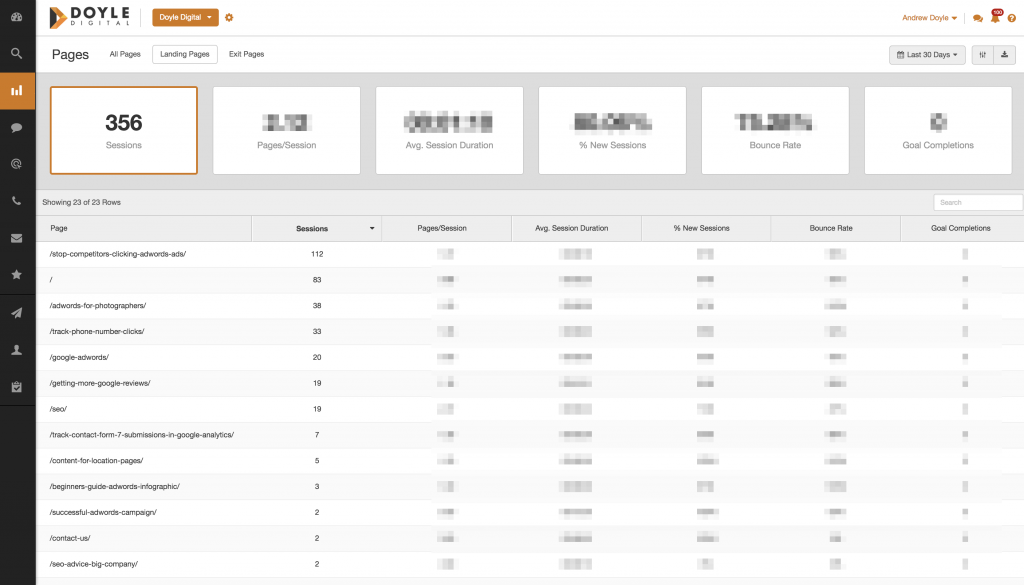
If you look at this Last 30 days snapshot of my Organic traffic, you can see that more people land on blog posts than they do on my homepage, SEO page and AdWords page combined.

My most popular page, by far, is my post about click fraud which even ClickCease picked up on.

You’ll notice that all of this content is attracting people to my website because it actually helps people out and answers the questions that they asked through their Google search.

Your Post’s Topic & Identifying Potential

I was recently working on my Best Position In AdWords post, trying to make it a bit longer to boost its on-page value and its rankings in Google.

I thought to myself “I wonder if most people know how to do this”.

Then I thought “How many people even ask this question?”

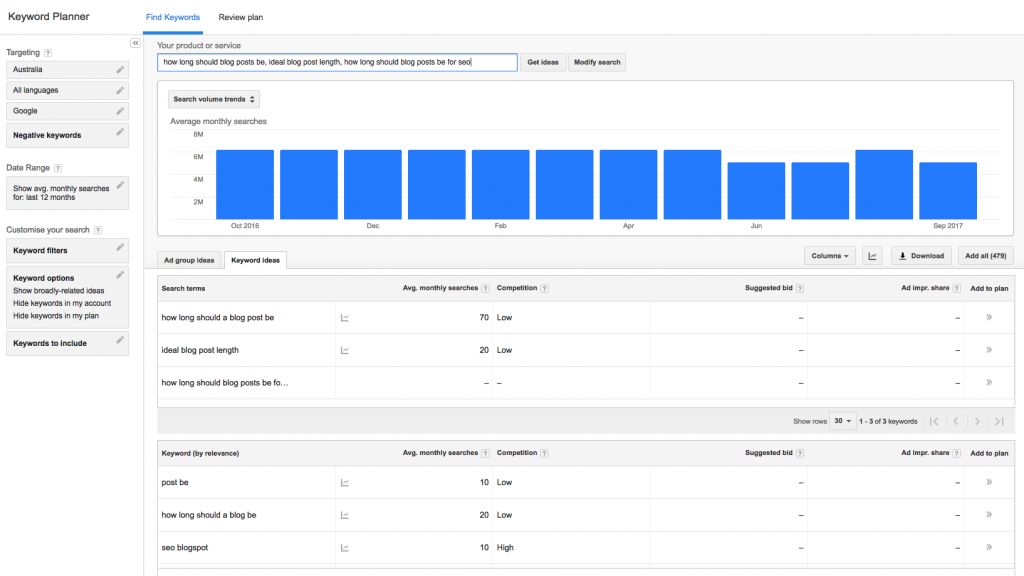
And that’s when I turned to the Google AdWords Keyword Planner.

Bingo!

At least 70 searches per month for the exact search query of “how long should a blog post be”.

And there’s likely to be heaps more for very similar searches that I can rank for at the same time.

So now I know what I want to write about, let’s see how I need to go about writing it so I can crack that sweet first page on Google for that term.

Checking Out The Competition

Let’s see who I’m up against for this target then!

The reason this step is important is because from here, you learn what the benchmark for a good ranking post/article is and what you need to do to provide something better.

Whilst some industries will compete just fine with 300-400 word blog posts (like in our example before), this whole SEO industry is fairly competitive as you could imagine.

So I suspect the competition is going to be a bit stiff and will require a fair bit of effort on my part.

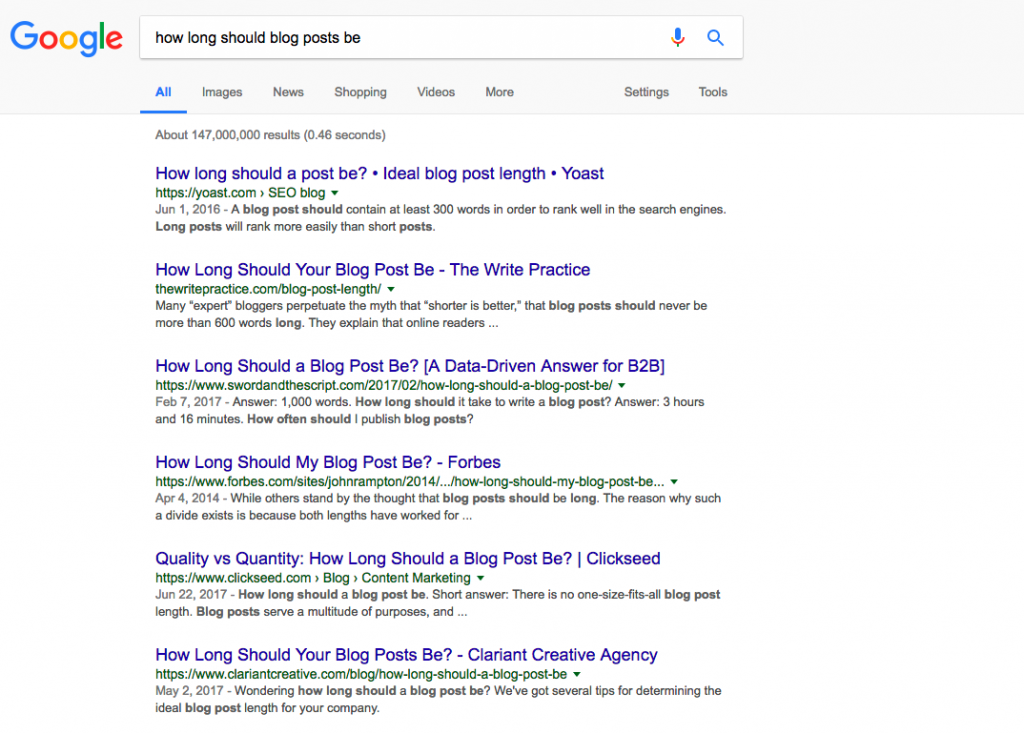
Okay then!  We’ll do a quick search for “how long should blog posts be” in Google and check out the top four websites for this exercise.

Yoast has around 660 words for their position 1 listing.

The Write Practice has roughly a whopping 1,200 words for their 2nd place listing.

Sword And The Script has about 1,150 words for their 3rd place listing.

Forbes is coming in at around 1,100 words too.

You can see the similarities here with the exception of Yoast, which is ranking first despite only having half of the word count as the other 3 listings.

The thing is, Yoast  is a hugely popular SEO tool for WordPress and has a monster backlink profile.

If I want to compete, I’m either going to have to match the backlink profile of Yoast, or I have to smash that ~1,200 word count.

So I’ll aim to make this blog post around 1,600 words in order to have a really good crack at one of those tops spots.

I don’t know about you, but I think the word count route is going to be far easier, cheaper and more effective for a solo operator like myself.

Of course, I’m oversimplifying a whole bunch of ranking factors in Google and quality of SEO copywriting over sheer quantity, but I don’t want to stray too far off the “how long should a blog post be” topic.

How to get more Google reviews

Even if you’re a thriving business with heaps of happy and loyal customers, getting them to leave a review on Google is often challenging.

The thing is, reviews on Google are super important from both an SEO point of view but also from a general marketing stand-point. If you are looking for a service provider on Google and you see a business listing with tonnes of positive reviews, it makes sense to go with those guys, right (even if they’re not first on the list)?

Plus, those stars on the listing immediately pull attention towards your listing. You need at least 5 reviews to get stars on your Google My Business listing.

Antenna Direct Perth has a listing in the map pick which is only 3rd but will undoubtedly get more clicks because of those stars appearing next to it.

Now, there are services where you can pay to get reviews on your listing which I would highly recommend staying away from. Google is getting extremely clever at pinpointing attempts of manipulation so protect yourself in the long-term and keep clear, especially if these reviews end up coming from accounts from parts of the World that you don’t even operate in (India comes to mind).

Paid reviews may temporarily fool Google, but they often don’t fool human beings who are looking at your reviews with the intention of hiring you/buying off you.

If you don’t already have a Google My Business listing, it’s free and you can sign up for your page/listing by clicking here.

How To Create A Google Review Link

You’re probably wondering how to send people to review you on your Google My Business page.

Guiding people can often be confusing, but it can be done with a simple one-click link.

So, here’s how you generate a link that sends customers straight to your Google My Business page with the review box popped up and ready to go!

Let’s use Doyle Digital as an example and search Google for “doyle digital” – I end up with a URL like this:

google.com.au/search?q=doyle+digital&oq=doyle+digital+perth&aqs=chrome..69i57j69i60l3.2359j0j1&sourceid=chrome&ie=UTF-8

See the area that I’ve underlined that starts with a &aqs=? Get rid of all of that stuff, it’s browser specific (my browser was Google Chrome in this scenario) and it will break the link for those who are using other browsers like Safari (which iPhones use by default).

Now that we’ve got a clean URL that will work on any browser like (mine now looks like google.com.au/search?q=doyle+digital&oq=doyle+digital), hit enter in your URL bar.

Now, click on “Write a Review” and look back at your URL bar. You’ll notice some an additional script has been added at the end, that is a command to make the review box pop up automatically so copy it.

Mine now looks like this: google.com.au/search?q=doyle+digital#lrd=0x2a32ab7faf3f80bb:0x1adc60ce24a20796,3,

Great! You’ve got a clean reviews URL!

So how do you get people to actually act and leave you a review on Google?

Well, here are 5 immediately actionable approaches to get things kick started.

1. Friends and Family

Don’t be ashamed to ask your friends and family to show your business some love. This is often the quickest way to boost you up to that minimum 5 reviews to obtain stars on your Google My Business listing.

Having a basic level of reviews is great for our next stages of review hunting as people often feel more comfortable adding to your reviews rather than giving you your only one.

2. Link In Your E-Mail Signature

Every interaction with your customers is an opportunity.

A nice and subtle way to implement this is show here in Lousie’s e-mail signature from GoGo Media.

Having a link in your e-mail signature is a nice, continual and non-pushy way to remind people that their review will really help your business out.

3. Post-Job Text Messages

I got this one from Hursh at Tradesign.

And it works stupidly well for trade services.

After every job, send a text message to the customer with a link to review you on Google (since they likely called you from their mobile, you should already have the number).

Make sure that you do this fairly quickly whilst the service is still fresh in the mind. The fact that you’ve texted so soon after is a nice touch and feels like a follow up.

Being in a text message rather than an e-mail feels more personal too and often gets a high response rate.

Problem: The URL we made before is ridiculously long to be putting into a text message.

Solution: Go over to the Google URL shorter and paste that clean reviews URL in there and hit enter to get a nice and compact URL that won’t look horrendous in a text message.

4. Monthly E-Mails

If you have a CRM (Customer Relationship Management) in place, you can run who you’ve done business over the last 30 days at the end of each month.

Utilise an e-mail marketing tool like MailChimp to create a basic template.

A tool like MailChimp will allow you to import your e-mail contacts’ details and create custom name fields

Ensuring all of your contacts are addressed by name is great for personalisation and to avoid spam filters.

You get some cool reports too with information on how many people opened your e-mails, clicked through to a link inside the e-mail and who unsubscribed.

Whilst you will get some traction with these, the response rate is typically quite low. I’ve sent some monthly e-mails out for clients which resulted in no additional Google reviews at all.

That is, however, until I started to offer incentives…

5. Vouchers or Other Immediate Incentive

Now, this method could be viewed as paying for reviews (which is a no-no), but hear me out.

Incentivising reviews is no different from a giveaway on Facebook by liking or sharing a post or a cafe giving you free WiFi after checking in. So long as your not instructing your customers to leave you 5-star reviews in order to receive the incentive and that they are actually genuine customers that you have provided a service for, this method is as white-hat as you can get.

An example of incentivising Google My Business reviews is offering something everybody can use, such as a Coles Myer voucher or a Dan Murphy’s voucher. You could even offer a discount on a next purchase if your services are regularly repurchased.

Either way, make sure it’s something that your customers will act on in order to obtain.

Here is a very basic e-mail that I sent out on behalf of Able Removals with a $15 Dan Murphy voucher on offer.

This was made by populating a basic MailChimp template, which you can use for free.

As you can see, it’s nothing flash – but it got the job done.

This was only sent out to 20 customers to start off with and we got a response rate of 5 people. That’s a 25% success rate!

(We may even get a couple more from that mailout by people who are taking their time, too!)

Looks good, right?

And you can track everything in a spreadsheet to make sure you’re keeping track of who has reviewed and who you have sent vouchers out to.

6. Competitions/Giveaways

If you have a large e-mail list (500+) that you want to send out a review request to, it may actually be cheaper overall to offer a big ticket item where people can enter the draw by leaving a review on Google.

Again, make the giveaway something that people will actually want. For example, giving away an Apple Watch is a great example.

I understand that sounds like an expensive way to get reviews but if you only have to pay $400 once and end up with 30 reviews, you’re $15 better off than if you used the previously mentioned $15 voucher incentive.

I must stress again that this is a tactic that would only be appropriate for a business with a large e-mail list and who would realistically achieve around 40 to 50 reviews from this exercise.

What If I Get Bad Reviews?

Even if you’re careful about who you send review requests to, it is inevitable that you’re going to get the odd ‘okay’ or ‘bad’ review on your profile.

And that makes you look all the more genuine.

Wouldn’t you have doubts about a business that has all 5-star reviews, not one somewhat satisfied or disgruntled customer?

Even the best service providers get a bad review from time to time. It’s unavoidable and consumers aren’t oblivious to that.

Besides, more often than not, people who leave bad reviews in unreasonable circumstances don’t leave the most compelling (or literate) arguments as to why they were dissatisfied.

When you do get negative reviews, it’s always a good idea to respond in a way that defends yourself without attacking the reviewer, like Lavish Limousines have done below.

Then, you have competitors trying to sabotage your reviews as well which is what likely happened below with WA Legal, who politely managed to discredit the review.

You have to remember, in these scenarios, whilst you know bad reviews are fake the general public do not.

So make sure that your response doesn’t make you look even worse by being overly defensive or accusing the reviewer.

Always remain calm, stick to the facts and maintain a professional image.

You also need to remember that some disgruntled customers will go out of their way to leave a bad review if they think they’ve had a bad experience with your company, whether it’s your fault or not.

Those people who are going out of their way to seek revenge aren’t waiting for your review link.

So arm yourself with as many positive reviews early on so that when you do get a 1-star review, it will appear inconsistent with the overwhelming of positive reviews.

Otherwise, you risk being that business on the map pack with just a couple of 1-star reviews and nothing positive to offset it.

Can I Delete My Google My Business Page And Clear The Reviews?

Nice try, but no.

When you declare a business permanently closed or try to delete the listing, the data of that business is still stored by Google.

So, if you were to then re-open that business to start from scratch; you’ll be disappointed to see that those reviews you were trying to clear will either immediately or eventually return.

Again, the best way to combat bad reviews is to respond professionally to the dispute and to drown them out with positive reviews.

How Do I Get My Clients’ E-Mails?

Ideally, you would have a CRM (Customer Relationship Management) tool where all of your clients’ personal information is stored securely on.

If not, you can pull your address book from the e-mail account that you communicate with your customers on.

This list will likely contain personal contacts, suppliers and other non-customers’ e-mail so you will want to inspect your list and manually remove those who are not appropriate targets for this communication.

Below are some instructions on how to pull e-mail lists from various e-mail clients:

Is This Against Google’s Guidelines

Technically… yes.

Any tactics which request, prompt or incentivise people to leave Google reviews are against Google’s guidelines.

However, most of what any SEO does is technically “against Google’s guidelines”.

In theory, we’re all just meant to create content on our websites, blog about our industry and then sit back, praying that the links will just occur naturally when we all know that isn’t the case.

In other words; don’t stress about it.

So long as these reviews are from genuine customers and that they haven’t been told what to write or how many stars to give, it’s as natural as you can be whilst ensuring that you’re making your business look appealing online and keeping up with the competition.

Now, go get more reviews on Google!

I hope that this guide has gotten you excited to go out there and get more reviews on your Google My Business listing.

How to write unique SEO content for location pages

Most small businesses operate in a particular area around where their store is physically located.

These business owners often want to rank for their whole city. This approach has no benefit to themselves, their customers, or their ability to rank as Google wises up to businesses targeting areas that they don’t actually exist in.

So does that mean you should only try to rank in your own exact area?

As a business owner you obviously don’t want to limit your customer base to the one single suburb that you happen to operate from.

Customers are willing to drive over to the next suburb for local services. So it’s realistic that you would obtain genuine leads from the suburbs that are right next to you, and that those search users would genuinely find your services of relevance to them.

Firstly, Are Suburb Pages Dodgy?

What Google dislikes are “doorway pages”.

Doorway pages are pages on a website that offer no real value to the search user and exist only to acquire traffic for additional search keywords.

What this means, using our florist as an example, is that we can’t go making a page that targets “florist Joondalup” and another page that targets the keyword “flower delivery Joondalup”.

What we’re trying to do is different.

Our example business in Edgewater is still useful to real people that live in these surrounding areas and therefore we have a right to prove it to search engines without the fear of being pulled up for gaming the system.

So, writing SEO content with the right level of Search Engine Optimisation for location pages ticks the boxes both for being useful, and for being relevant in the real world.

Planning Our Location Pages

In this scenario we’re a Florist in Edgewater and we want to target our surrounding suburbs for both our flower delivery service as well as attracting some in-store visits from people in these neighbouring suburbs.

For this example business, we’re wanting to target the immediately neighbouring suburbs of Joondalup, Heathridge, Beldon, Craigie and Woodvale.

So, now that we know which suburbs we aim to target, we now need to create a unique page for each suburb so we can individually optimise each location page for SEO:

Let’s start off with the URL structure.

  • Heathridge: floristwebsite.com.au/heathridge
  • Joondalup: floristwebsite.com.au/joondalup
  • Beldon: floristwebsite.com.au/beldon
  • Craigie: floristwebsite.com.au/craigie
  • Woodvale: floristwebsite.com.au/woodvale

These suggested URLs are clean and future proof as they’re not over optimised.

Examples of how to NOT structure these URLs are:

  • floristwebsite.com.au/florist/florist-heathridge
  • floristwebsite.com.au/florists-in/heathridge
  • floristwebsite.com.au/florists-heathridge
  • floristwebsite.com.au/flower-delivery/heathridge-florists

Whilst you may see some websites ranking high and mighty with a URL structure like this, it doesn’t mean you should or even need to copy them.

These websites that have resorted to spammy URL structures may very well be a ticking time bomb about to explode and fall from their top end rankings.

Another theory is that Google gives a pass to some of these businesses that put their websites together back in the day when this sort of behaviour was acceptable, but won’t ignore it for newer websites.

Making Suburb Pages Rank In Google

In the past, it would be acceptable to start writing copy for your Joondalup page and then copy and paste that over when you create the Heathridge page, but just swap the location words to suit.

Nowadays with the looming threat of duplicate content penalties and the rewards for unique SEO content; that strategy can hardly be called a strategy at all.

There are two topics on every location page which we need to prove  relevance to Google.

  • Relevance to the service
  • Relevance to the area

So on our Heathridge page, for example, the page needs to have relevancy to both florists and to the suburb of Heathridge in order to rank well for a keyword like “florist heathridge”.

In order to gain more relevancy, we need to naturally sprinkle our content with proof words for both topics.

Proof Words For Your Service

Littering your content with direct variations of your main keyword (Florist Joondalup, Flowers Joondalup, Joondalup Florist, etc.) will get you hit with a penalty for keyword stuffing pretty quickly. Instead of shouting out what you are to Google, try to prove what you are instead with what I like to call “proof words”.

We have to forget about keywords for a moment and start thinking about words that are related to the word ‘florist’ in the real world. So let’s go ahead and think of some words that you’d associate with Florists (bust out the Thesaurus if needed):

  • Flowers
  • Floral
  • Bouquet
  • Trimming
  • Pruning
  • Vases
  • Arrangements
  • Stems
  • Fresh
  • Grown

You get the idea. So make sure that you embed these proof words when writing up SEO content for your location pages to make sure that Google can see the relevance of your copy to the main subject (Florist).

Why do we have to do this? Because Google is no longer going to rank a page just because you’ve stuffed your main keywords into the content a few times, especially when the rest of the content isn’t completely relevant to those keywords. Remember that modern search bots used by providers such as Google and Bing are trying to offer the best content to their search users as possible and they’re getting pretty darn good at it too!

Proof Words For Your Suburb

Now that we’ve proven what we are and what we provide, now we have to prove that we have some relevance to the location that we’re promoting ourselves and it has to be done a bit better than just tacking the suburb/area name to the end of each keyword.

First we want a meta title that contains the postcode and the state of your location like this: “Florist Joondalup WA 6027 – ExampleFlorist”

Next, make sure you place your main keyword “Florist Joondalup” in your main header tag (preferably a H1) like: “Your Local Florist Joondalup”

Now throughout the copy we need to be a bit clever. I usually like to open up Google Maps, enter the suburb that I’m trying to optimise the page for and look at what main roads and landmarks are around there and find a way to slip them into the copy.

Lastly, I like to go back into Google Maps, search the suburb and then embed the local Google map into the page.

This all may sound like we’re going a bit overboard, but since the rest of your website likely doesn’t mention this suburb at all you really have to make it extremely evident that what we’ve written on our location pages are genuinely relevant to that suburb for search engines to get the idea.

It makes sense for users who land on the page too.

It strikes a high level of relevancy when they see the mention of roads and landmarks that they know of as well as a map of the area where they live or work.

Note: What I have been calling “proof words” has been coined as ranking signal called “Topical Authority” in this post by Backlinko.

Bringing It All Together

Okay so now you’re wondering how you can possibly fit all of those requirements into a 300-400 word body of content (could be less or more depending on the level of competition) not just once, but multiple times for each location page.

Well, it can be hard, especially when there is really only so many ways you can describe the services of a florist…so I like to give the page a bit of personality.

Below is an example of the above principals being implemented on a website that has a “Florists Joondalup” page.

The tone is far from serious, but it’s engaging (to the people who actually read it), easier to write, and as an added bonus it could possibly generate some natural backlinks if someone decides the copy is quirky enough to show to others.

There have been many times when I’ve optimised location pages using the same strategy used here and have seen first page rankings or even in the top 3 positions as soon as Google crawls/re-crawls the website. Clever SEO content is rewarded so spend more time improving the overall quality of the content on every page of your website before you spend time chasing the next high authority or niche directory listing.

Location Pages For Mobile Services

The other time when we would use location pages are for mobile services such as an electrician, plumber or painter where the physical location base is irrelevant to the customer – as long as the service provider is willing to drive out and service that location.

Using our electricians from PWA Electrical Services as an example this time, let’s look at how we’ve laid out our suburb pages.

Firstly, whilst our links are not accessible from the main navigation, they’re not hidden and are naturally accessible in the footer of every service page.

Having these links here allows Google’s search bot to naturally crawl through the site and discover these pages without these links getting in the way of the main navigation area.

So, let’s click on one and see how it’s laid out, we’ll look at the Ballajura page (you can click on the image to enlarge and zoom in).

Now to see how one location page would differ from the other, let’s now go over to the suburb page we have for Nedlands.

Whilst the nature of the content is similar, it’s worded differently enough to be classified as unique content.

Keeping the content as unique as possible is important to ensure that pages on your website are not getting penalised for duplicate content, which Google is getting better and better at picking up on.

Make Sure Google Knows

These suburb pages are hugely important for local SEO along with increasing relevance site-wide for our bigger area wide keywords too.

So, don’t wait for Google to chance upon your valuable content.

Make sure you’re logging into Search Console (formerly Google Webmaster Tools) and requesting that Googlebot crawls your new pages, as I’ve done below with the suburb pages for Able Removals.

And Remember

Remember that these pages location/suburb pages are effectively going to be the Home Page for search users looking for your services in these areas.

This means that we have to make sure that any big call-outs or any other selling points that you have on your actual Home Page are going to be present on each one of these pages too. Some things you will want to include are:

  • Most popular products (if applicable)
  • Attractive images of your shop or even a Photo Sphere
  • Links to third-party review sites (Yelp!, TrueLocal, etc.)
  • Local phone number and address clearly visible as well as a contact form

These are all changes that you are able to action today and doesn’t cost you anything other than your time to implement the above advice.